Optimizing WooCommerce Product Pages for Conversions

Your WooCommerce store might have great products—but are your product pages doing them justice? If visitors aren’t converting into customers, it might be time to optimize how your products are presented.

At NDIC, we help store owners fine-tune every element of their WooCommerce websites to ensure they’re converting browsers into buyers. Below are some practical, easy-to-implement tips to help you get more out of every visit—and how our expert team can step in to help when you’re ready.

1. Use High-Quality Product Images

People shop with their eyes. Blurry, small, or generic images will hurt your chances of making a sale.

Tips:

  • Use at least 3–5 images per product showing different angles.
  • Include zoom-in functionality.
  • Add lifestyle photos that show your product in use.

Bonus: NDIC can help compress and optimize your images for faster load times without losing quality.

2. Write Clear, Benefit-Focused Descriptions

Don’t just describe your product—sell it. Instead of simply listing features, focus on how those features solve your customer’s problem. See more on how to creating compelling product descriptions that drive sales.

Tips:

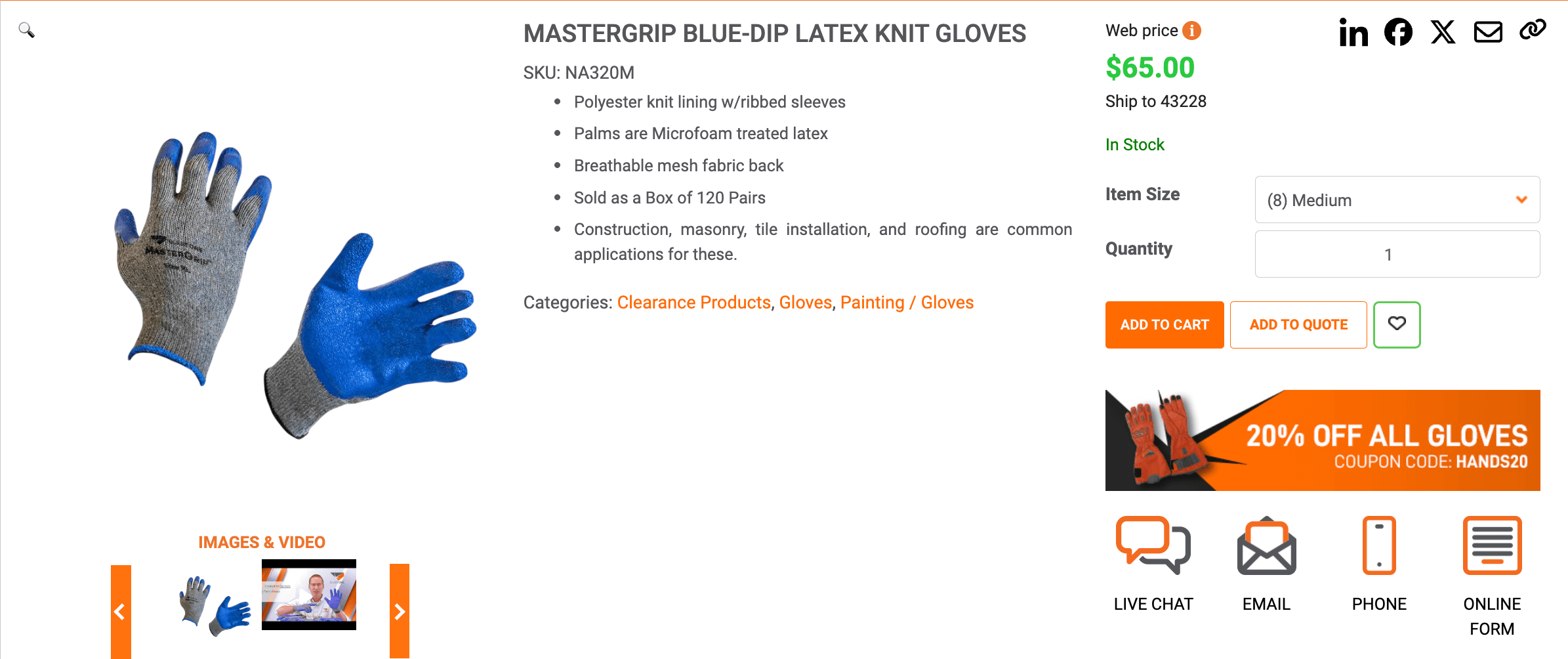
  • Use bullet points for quick readability.
  • Add emotion or storytelling to product descriptions.
  • Use language your audience connects with (friendly, technical, eco-conscious, etc.).

3. Make the “Add to Cart” Button Stand Out

This is one of the most important parts of the page—it should be impossible to miss. Here are some tips on how to reduce cart abandonment rate and recover lost sales

Tips:

  • Use a bold, high-contrast color that isn’t used elsewhere on the page.
  • Use action-driven language like “Buy Now” or “Get Yours Today.”
  • Keep the button above the fold (visible without scrolling).
4. Add Social Proof with Reviews and Ratings

Displaying customer reviews builds trust and directly improves conversions, so don’t forget to add social proof every time you can.

Tips:

  • Show average ratings at the top of the page.
  • Feature at least 3 reviews, including both text and images.
  • Make it easy for new customers to leave a review.

NDIC can integrate review tools and widgets that match your theme and enhance credibility.

5. Streamline Product Variations and Options

Too many dropdowns or unclear options can overwhelm shoppers so make sure your variations are clear for any user.

Tips:

  • Clearly label product variations (size, color, style).
  • Use visual swatches or buttons instead of plain text when possible.
  • Highlight available stock and low inventory to create urgency.

6. Display Trust Badges and Guarantees

If you offer free shipping, returns, or secure checkout—say so.

Tips:

  • Add icons near the “Add to Cart” button.
  • Mention any guarantees or warranties.
  • Reinforce secure checkout with payment logos or security icons.

7. Improve Page Speed and Mobile Experience

A slow product page kills conversions—especially on mobile devices.

Tips:

  • Optimize image size and use caching tools.
  • Use responsive design to make sure your pages work on all screen sizes.
  • Test page load time with tools like Google PageSpeed Insights or GTmetrix.

NDIC offers full WooCommerce performance audits and mobile UX improvements—let us do the heavy lifting while you focus on other important areas.

8. Use Smart Cross-Selling and Upselling

Don’t miss an opportunity to suggest related products or higher-value alternatives.

Tips:

  • Add “You may also like” or “Frequently bought together” sections.
  • Show recently viewed items to encourage revisits.
  • Suggest products that complement what the user is viewing.

9. Optimize for SEO and Rich Snippets

Help your products appear in Google with better metadata and structured content.

Tips:

  • Use descriptive titles and meta descriptions with target keywords.
  • Include product schema markup for ratings, price, and availability.
  • Keep URLs clean and readable.

Our NDIC team can help implement the basic SEO checklist for an optimized WordPress site to increase visibility and organic traffic.

Let NDIC Help You Convert More Shoppers into Buyers

Optimizing product pages is more than just tweaking copy or adding images—it’s about creating a seamless, trust-building shopping experience that leads visitors toward a purchase.

At NDIC, we specialize in WooCommerce development, optimization, and support. Whether you need a full site redesign or just a few enhancements to your product pages, we can help you:

✅ Improve page speed and performance
✅ Enhance your mobile shopping experience
✅ Streamline product variations
✅ Add reviews, trust badges, and advanced features

Ready to turn more clicks into conversions?
Give us a call or reach out today—we’re happy to chat about how to take your WooCommerce site to the next level.
Top UX Best Practices for 2025 Web Design

As we progress through 2025, user expectations for website experiences continue to rise. Users demand fast, intuitive, and personalized interactions across all devices. To meet these expectations, businesses must prioritize user experience (UX) in their web design strategies. This article explores the latest UX best practices for websites in 2025, offering actionable insights for main navigation, body content, footers, and e-commerce specifics.

Main Navigation: Clarity and Efficiency

Effective navigation is crucial for guiding users through your website. In 2025, the focus is on simplicity and user-centric design.

Best Practices:

  • Limit Main Menu Items: Keep the main navigation to 5-8 items to avoid overwhelming users.
  • Use Descriptive Labels: Employ clear, concise labels that accurately represent the content they link to.
  • Implement Mega Menus for Complex Sites: For websites with extensive content, mega menus can organize links into categories, enhancing discoverability.
  • Ensure Mobile Responsiveness: Design navigation that adapts seamlessly to various screen sizes, utilizing hamburger menus or bottom navigation bars for mobile devices.

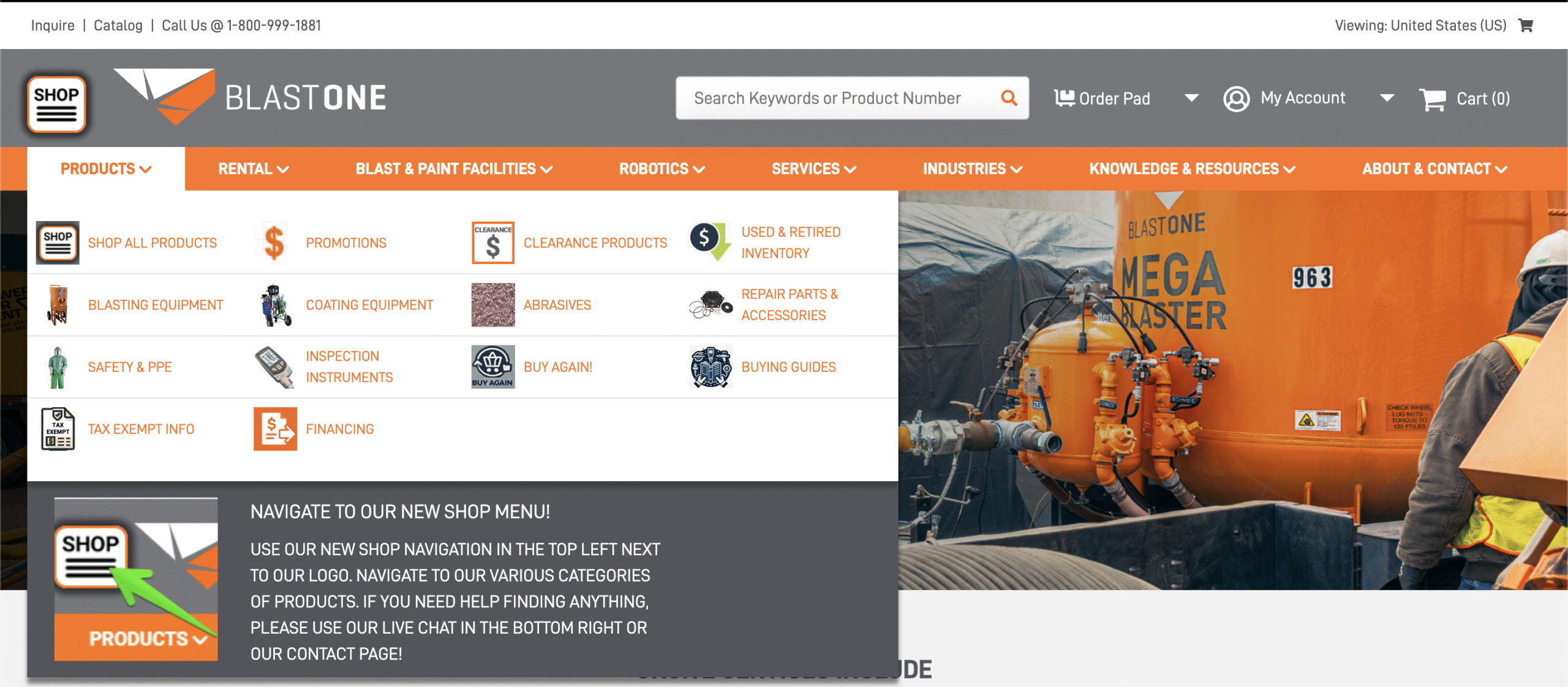
The BlastOne Main Navigation has a lot of content so the main navigation need to be descriptive but as concise and clear as possible.

Body Content: Engaging and Accessible

The main content area should be engaging, informative, and accessible to all users.

Best Practices:

  • Prioritize Content Hierarchy: Use headings, subheadings, and bullet points to structure content logically. This is also part of the SEO basics you should consider on your website.
  • Incorporate Visual Elements: Utilize images, videos, and infographics to break up text and illustrate key points.
  • Optimize for Readability: Choose legible fonts, appropriate text sizes, and sufficient line spacing.
  • Ensure Accessibility: Implement alt text for images, maintain high contrast ratios, and enable keyboard navigation to accommodate users with disabilities.

According to DesignStudioUIUX, integrating A/B testing and user testing throughout the design process ensures that content resonates with the target audience.

Footer: Informative and Functional

The footer serves as a secondary navigation area and should provide essential information without clutter.

Best Practices:

  • Include Key Links: Provide links to privacy policies, terms of service, contact information, and social media profiles.
  • Organize Content: Group related links under clear headings to facilitate easy scanning.
  • Maintain Visual Hierarchy: Use font sizes and weights to distinguish between different types of information.
  • Ensure Consistency: Keep the footer design consistent across all pages for a cohesive user experience.

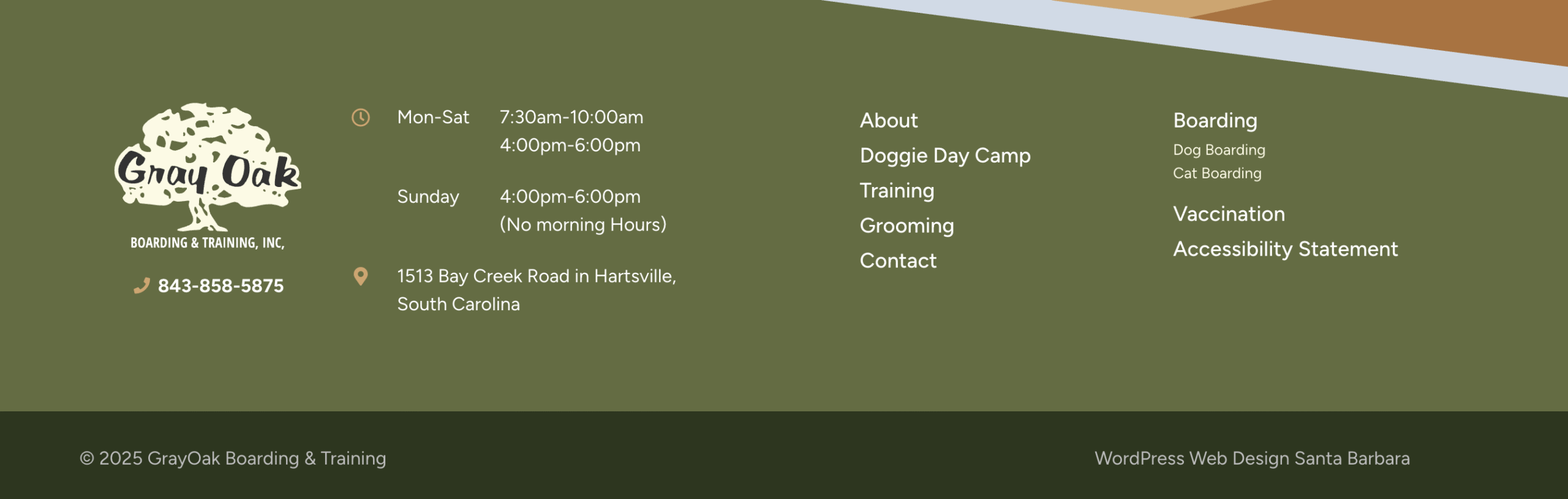
Take a look at the footer from Gray Oak Boarding & Training School You have all the key links handy, as well as their main contact information, while ensuring the design consistency with the rest of the page.

E-commerce Specifics: Streamlining the Shopping Experience

E-commerce websites require specialized UX considerations to facilitate seamless shopping experiences.

Best Practices:

  • Simplify Navigation: Implement predictive search features and intuitive filtering options to help users find products quickly.
  • Enhance Product Pages: Provide high-quality images, detailed descriptions, customer reviews, and clear calls-to-action.
  • Optimize Checkout Process: Minimize the number of steps required to complete a purchase and offer multiple payment options.
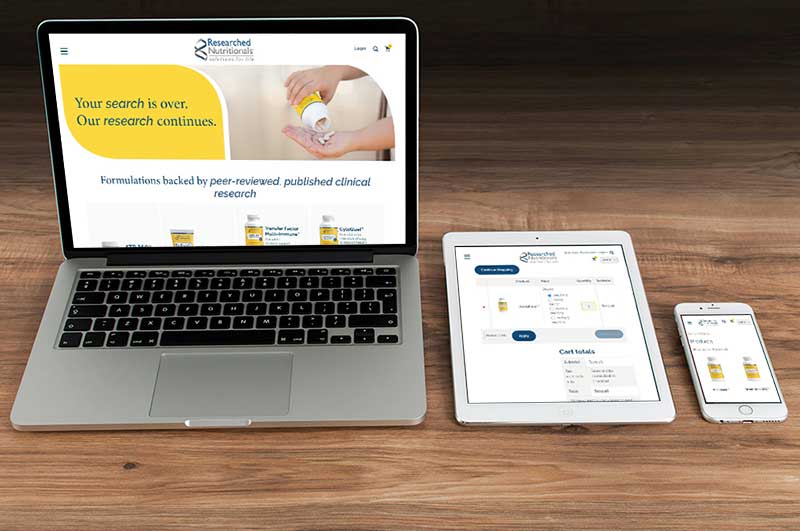
  • Implement Responsive Design: Ensure the website functions smoothly across all devices, particularly mobile, as a significant portion of e-commerce traffic comes from smartphones.

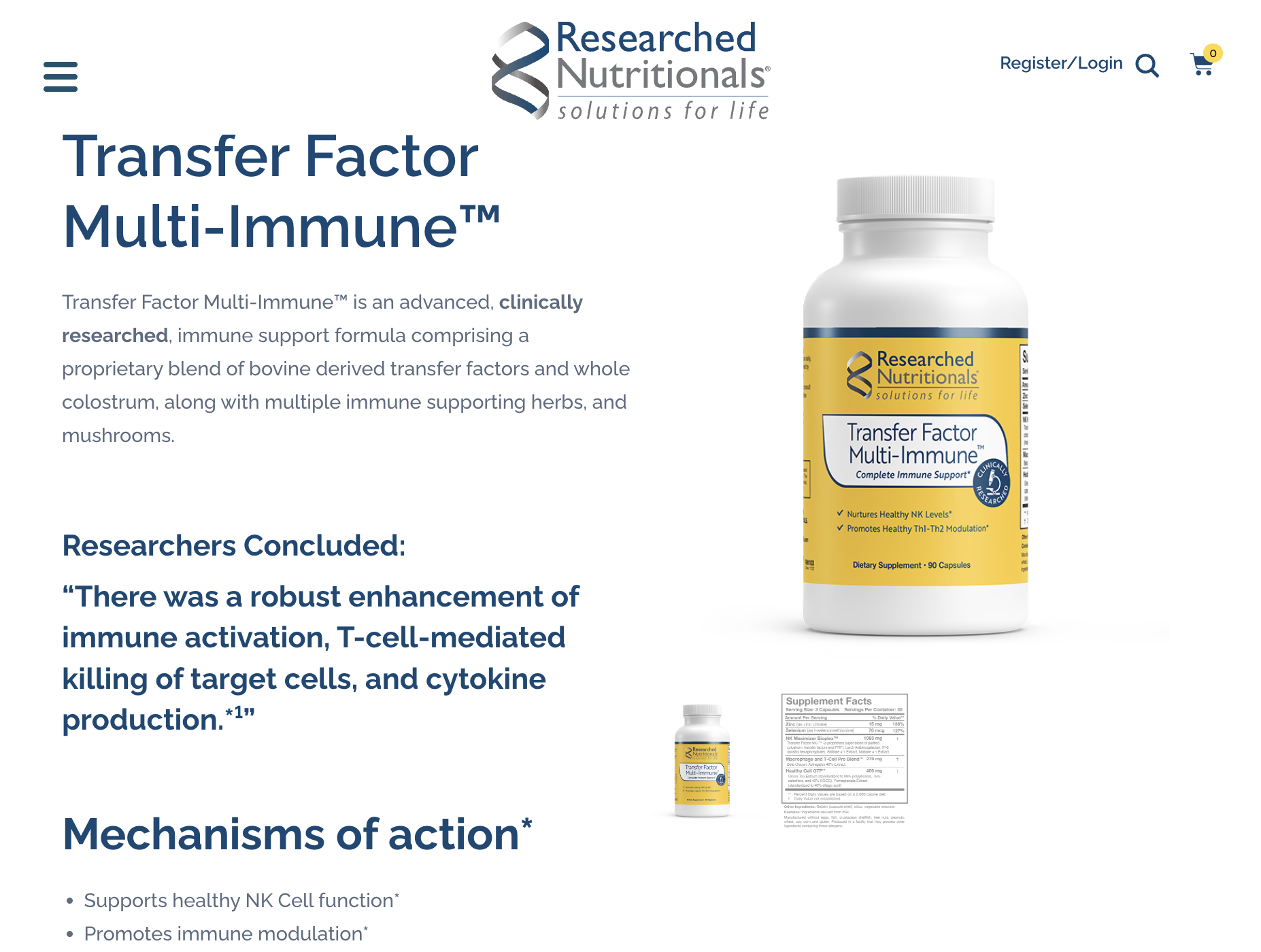
A good example is Researched Nutritionals, with a very simple menu, but all the product information needed and very well organized.

Conclusion

Adhering to UX best practices in 2025 involves creating intuitive navigation, engaging content, functional footers, and optimized e-commerce experiences. By focusing on user needs and behaviors, businesses can build websites that not only attract visitors but also convert them into loyal customers.

For more insights on UX design and web development, explore our blog or contact our team for personalized guidance.

Staying Visible and Valuable in the Age of AI Search

Search is evolving. With AI-powered summaries now answering many questions directly on Google, fewer people are clicking through to actual websites. That means the old strategies—like relying solely on SEO or paid ads—aren’t enough on their own anymore. But don’t worry. At NDIC, we’re helping our clients stay visible and valuable in this new AI-driven world. Here are steps you can take—along with how NDIC can help—to make sure your site stays strong, visible, and valuable in this new search landscape.

✅ Step 1: Strengthen Your Brand Presence

Why: People are more likely to click if they recognize your name or trust your brand.

What You Can Do:

  • Keep your messaging consistent across your website and social platforms.
  • Add testimonials, awards, and team bios to build trust.
  • Use branded search terms in your page titles and descriptions.

How NDIC Helps:
We can refresh your homepage, improve design consistency, and help position your business as a trusted leader in your field.

✅ Step 2: Optimize for Conversions, Not Just Clicks

Why: You may get fewer visitors—but every visit can still lead to a sale or contact.

What You Can Do:

  • Make your calls-to-action easy to see and act on.
  • Streamline your forms and checkout process.
  • Keep your site fast and mobile-friendly.

How NDIC Helps:
We can audit your site and make speed and UX improvements so it performs better where it counts.

✅ Step 3: Add Structured Data to Your Site

Why: Structured data helps search engines understand your content and show it in rich formats like FAQs or product listings.

What You Can Do:

  • Add schema markup for your business info, events, products, and FAQs.
  • Use clear headings and content sections that AI can easily scan.

How NDIC Helps:
We’ll add the correct structured data to your site for better visibility in search and AI summaries. We can also help you with On-site SEO edits to boost organic visibility

✅ Step 4: Build Your Own Direct Traffic Channels

Why: You don’t have to rely solely on Google—bring people to your site through other avenues.

What You Can Do:

  • Send regular newsletters.
  • Share blog content or promotions on social media.
  • Consider podcast interviews, webinars, or YouTube.

How NDIC Helps:
We can integrate email signup tools, help with blog publishing, or create a content strategy with you. Here is another article in case you want to read about Email Marketing Tips and Tricks to Drive Sales

✅ Step 5: Add a Smart Chatbot to Your Site

Why: AI isn’t just on Google—you can use it on your site to improve engagement and customer support.

What You Can Do:

  • Add a chatbot that answers FAQs, guides visitors, and captures leads.
  • Customize it with your brand voice and top questions.

How NDIC Helps:
We offer a powerful NDIC ChatAI built specifically for WordPress sites. We’ll install and customize it for you.

✅ Step 6: Refresh and Personalize Your Content

Why: AI struggles to summarize content that’s personal, story-driven, or interactive—so lean into that.

What You Can Do:

  • Share customer stories or personal insights.
  • Update older blog posts with fresh, relevant info.
  • Add tools, guides, or visual content that users engage with.

How NDIC Helps:
We can help edit or rewrite existing content, and brainstorm ways to make your site more engaging.

As the internet evolves, your website should too.

We’re here to help you stay ahead—with hosting, design, AI tools, and development that’s always one step ahead of what’s next. Need help taking any of the steps above? Just reach out.

AI’s Hallucinations: Identify and Prevent them

Artificial Intelligence (AI) has made remarkable strides in recent years, transforming industries and enhancing productivity. However, as AI systems become more sophisticated, they also present new challenges, notably the phenomenon known as “AI hallucinations.” These are instances where AI models generate information that appears plausible but is incorrect or entirely fabricated. Understanding and addressing these hallucinations is crucial to harnessing AI’s full potential responsibly.

What Are AI Hallucinations?

AI hallucinations occur when an AI system produces outputs that are not grounded in its training data or real-world facts. For example, a chatbot might confidently provide a detailed answer to a question, but the information is inaccurate or nonexistent. This issue is particularly prevalent in large language models (LLMs) like ChatGPT, which generate text based on patterns in data rather than verified facts.

The Prevalence of AI Hallucinations

Recent studies highlight the frequency of AI hallucinations:

  • According to a 2025 report by All About AI, hallucination rates among AI models vary significantly. For instance, Google’s Gemini-2.0-Flash-001 has a hallucination rate of just 0.7%, while TII’s Falcon-7B-Instruct exhibits a rate of nearly 30%.

  • A study published in the Cureus Journal of Medical Science found that out of 178 references cited by GPT-3, 69 were incorrect or nonexistent, and an additional 28 could not be located through standard searches.

These statistics underscore the necessity for vigilance when utilizing AI-generated content, especially in critical fields like healthcare, law, and finance.

Tips to Identify and Prevent AI Hallucinations

While AI tools can boost efficiency and support decision-making, it’s essential to remain cautious about their limitations — especially when it comes to hallucinations, or confident-sounding but incorrect outputs. Here’s how to spot and reduce them:

1. Cross-Verify Information: Never assume an AI-generated response is fully accurate. Always double-check facts, figures, or claims against trusted sources, especially when the output is used in client-facing or high-impact contexts.

2. Look for Signs of Fabrication: AI hallucinations often include made-up statistics, citations, or overly vague answers. Be skeptical if a reference link doesn’t work, a quote can’t be traced, or the response lacks specificity.

3. Use Clear and Specific Prompts: Vague prompts can lead to vague — or incorrect — answers. Be as detailed as possible in your inputs to help the AI generate more accurate and relevant content.

4. Implement Retrieval-Augmented Generation (RAG): If your system supports it, connect the AI to a reliable database or knowledge base. This helps ground its responses in real, verifiable data rather than relying solely on patterns in its training.

5. Restrict Use in High-Stakes Scenarios: For applications involving legal, medical, or financial guidance, always treat AI as a support tool — not a final authority. Human oversight is essential in these areas.

6. Educate Your Team: Encourage users to approach AI with healthy skepticism. Training your team to ask follow-up questions, check sources, and report questionable outputs can help maintain quality and avoid costly mistakes.

By building awareness and integrating thoughtful checks into your workflow, you can safely leverage AI’s power while avoiding the pitfalls of misinformation.

The Role of Human Oversight

Despite advancements in AI technology, human oversight remains indispensable. AI systems lack the nuanced understanding and ethical considerations that humans bring to decision-making processes. By combining AI’s efficiency with human judgment, organizations can leverage the strengths of both to achieve optimal outcomes. 

If your company uses an AI chatbot for example, it’s essential to actively monitor its interactions with users to ensure the information it provides is accurate, relevant, and aligned with your brand’s tone and values. While AI tools can streamline customer support and enhance user experience, regularly reviewing conversations allows your team to identify and correct these instances quickly, ensuring that the chatbot builds trust rather than confusion.

Setting clear boundaries for what the chatbot can and cannot respond to, and having escalation paths for sensitive topics, can further safeguard the quality and reliability of your customer communication.

Conclusion

AI continues to revolutionize the way we work and interact with technology. However, the phenomenon of AI hallucinations serves as a reminder of the importance of human involvement in AI applications. By staying informed, implementing best practices, and maintaining a critical perspective, we can ensure that AI remains a powerful and reliable tool in our digital arsenal.

If you’re exploring how AI can help streamline your processes or enhance your projects, we’re here to guide you. Whether you need support choosing the right tools or ensuring your implementation is effective and reliable, our team is happy to help. Give us a call — let’s talk about smart, strategic AI solutions.

NDIC’s Plugin Reliability Review for Optimal site Health

If your WordPress website hasn’t been checked or updated in a while, you’re not alone. Many site owners install plugins over time and forget about them — some go unused, others become outdated, and a few may even stop receiving updates altogether.

That’s where NDIC’s Plugin Reliability Review comes in.

Our review process is designed to help you maintain a secure, stable, and high-performing website by identifying and resolving plugin-related risks before they impact your site or your business.

What Is the Plugin Reliability Review?

The Plugin Reliability Review is a comprehensive assessment of all the plugins currently installed on your WordPress website. Our goal is to:

  • Identify plugins that are unused or unnecessary
  • Flag any that are outdated, abandoned, or vulnerable
  • Ensure everything is compatible with the latest version of WordPress
  • Recommend safe replacements where needed
  • Test thoroughly before applying changes to your live site

By reviewing and updating your plugin ecosystem, you’re not only improving your website’s performance, but you’re also taking proactive steps to protect it from security threats and potential breakdowns.

✅ Why Is This Important?

Maintaining a healthy set of plugins is not optional in today’s web environment — it’s critical. Here are some of the key benefits of performing a regular plugin review:

Security

Outdated or abandoned plugins are one of the most common ways hackers exploit WordPress sites. A review ensures your site isn’t running plugins with known vulnerabilities.

Performance

Many plugin updates include performance improvements that reduce load time and improve site speed. Removing bloated or unused plugins also lightens the load on your server.

Compatibility

Outdated plugins may not work well with newer versions of WordPress core or with other updated plugins. Keeping everything aligned minimizes the risk of site-breaking conflicts.

New Features

Plugin authors often add new features in updates that you might be missing out on if you haven’t reviewed your plugin stack in a while.

Bug Fixes

Regular updates also include critical bug fixes, ensuring your plugins function smoothly and don’t interfere with your site’s layout or functionality.

⚙️ How the NDIC Plugin Review Process Works

Our Plugin Reliability Review is methodical, thorough, and client-friendly. Here’s how we do it:

1. Create a Safe Testing Environment

We begin by cloning your live site to a staging server. This allows us to safely update and test plugins without affecting your live website.

2. Perform the Full Plugin Assessment

We go through every plugin installed on your site and:

  • Check if it’s in active use
  • See when it was last updated by its developer
  • Look for signs of abandonment or security issues
  • Evaluate ratings and active installs
  • Compare features and performance with better alternatives if needed

3. Create a Plugin Report

We compile all findings in a detailed spreadsheet, which includes:

  • Notes on each plugin’s status
  • Our recommendations (keep, update, replace, or remove)
  • Any actions requiring your input or approval
  • You and your team will have full visibility and control over what gets changed

4. Client Review and Approval

Once you’ve reviewed the report, you’ll have the opportunity to ask questions, test features on the staging site, and provide final approval before we make changes to your live website.

5. Update and Optimize Plugins

With your approval, we’ll:

  • Safely update your plugins
  • Remove unused or risky ones
  • Replace outdated or abandoned ones

6. Live Site Push and Final QA

Once everything is fully tested and verified on staging, we push the changes to your live site. We then perform a final quality assurance check to make sure everything runs smoothly.

⏰ How Long Does It Take?

A typical Plugin Reliability Review can take between 4 to 8 hours, depending on your site’s complexity and the number of plugins involved.

If any replacements are required, we’ll flag those in the report and provide time estimates separately, so you can decide how to proceed based on effort and budget.

️ Ideal For: Sites That Have Been Left Untouched

If your website hasn’t been maintained in months — or even years — this review is the perfect starting point. We frequently work with business owners, nonprofits, and marketing teams who know their site “needs help” but aren’t sure where to start.

We’ll help clean up the clutter and make sure you’re running a site that’s secure, efficient and up-to-date.

⛓️ Don’t Wait for Something to Break

One of the biggest risks we see is when outdated plugins are left alone until a major update or security breach forces a repair. By that point, it often becomes more expensive and time-consuming to fix than it would have been to maintain things regularly.

✉️ Ready for a Plugin Review?

Whether your WordPress site is a few years old or just hasn’t been updated in a while, NDIC can help you get it back in shape — safely and strategically.

Contact us today to schedule your Plugin Reliability Review and start taking back control of your website’s health.

Elementor Giving You Trouble? We’ve Got the Fix!

Using Elementor? Here’s How NDIC Can Help Keep Your Site Updated and Running Smoothly

Elementor is one of the most popular page builders for WordPress, giving site owners and marketers the ability to build custom layouts without touching a single line of code. But while Elementor is powerful and user-friendly, it’s not without its quirks—and updates can sometimes cause more headaches than improvements if you’re not prepared.

At NDIC, we provide WordPress hosting and development support tailored to your setup, including Elementor-based sites. Whether you’re a DIYer looking for peace of mind or a busy business owner who just needs it done right, we’re here to help.

Common Issues When Updating Elementor

While regular updates are critical for security and performance, Elementor users often face issues like:

  • Broken layouts after updates – Changes in the Elementor core or incompatible plugin updates can break carefully built pages.
  • Slow page loading – Elementor is feature-rich, but excessive widgets or third-party add-ons can impact performance.
  • Widget conflicts – Not all third-party Elementor widgets play nice with others, especially after updates.
  • Theme compatibility problems – Custom themes or older themes may not support the latest Elementor functionality.
  • Editor loading errors – A white screen or endlessly spinning loader can leave you locked out of editing your site.

Quick Tips to Keep Elementor Running Smoothly

  1. Backup before updating – Always create a full backup before updating Elementor, your theme, or any plugins.
  2. Update in stages – Don’t update everything at once. Start with Elementor, then test before updating other plugins or themes.
  3. Use safe mode – Elementor’s Safe Mode can help you isolate issues without affecting your live site.
  4. Keep PHP and WordPress up to date – Elementor requires certain versions of PHP and WordPress to function properly.
  5. Minimize plugin bloat – Only install Elementor add-ons you really need. More isn’t always better.

When You Need a Pro: How NDIC Can Help

Some issues go beyond basic troubleshooting—and that’s where NDIC comes in. We specialize in managed WordPress hosting and development, and we know Elementor inside and out. Here’s how we can help:

  • Troubleshooting layout or compatibility issues after updates
  • Custom styling and design fixes when your layout breaks
  • Performance optimization to speed up Elementor-heavy pages
  • Custom widgets or template development to match your brand
  • Plugin and theme conflict resolution
  • Scheduled, worry-free maintenance so you never have to think about updates again

At NDIC, we offer proactive support for businesses that rely on their website. If you’re using Elementor and want to make sure your site keeps performing beautifully—without the stress—we’re just a call (or support ticket) away.

Need help with your Elementor site?
Let NDIC handle the updates and keep your site running smooth, fast, and frustration-free.

WooComerce or Magento: Which is the better value for your business?

When it comes to choosing an eCommerce platform, Magento and WooCommerce are two well-known names. Both offer powerful tools for building and managing online stores, but if you’re looking for scalability, flexibility, and cost-effectiveness, the differences between them become very clear.

At NDIC, we specialize in helping businesses redesign and migrate their websites to platforms that truly support their growth — and for many businesses currently using Magento, WooCommerce is a more affordable, user-friendly, and scalable alternative.

In this article, we’ll explore the key differences between Magento and WooCommerce, compare costs, highlight the advantages of WooCommerce, and explain why switching could be a smart move for your business — and how we can help you make it happen.

What Is Magento?
Magento, now owned by Adobe, is an open-source eCommerce platform known for its robustness and enterprise-level features. It’s highly customizable and built to handle large, complex stores with extensive product catalogs.

However, that power comes at a price — both in terms of development complexity and total cost of ownership. Magento can be resource-intensive, often requiring a dedicated IT team or agency for setup, maintenance, and upgrades.

What Is WooCommerce?
WooCommerce is a flexible, open-source eCommerce plugin designed specifically for WordPress websites. It powers over 25% of all online stores globally and is popular for its ease of use, affordability, and scalability.

WooCommerce transforms a WordPress site into a fully functional eCommerce store, offering powerful features without the steep learning curve or hefty costs typically associated with platforms like Magento.

Why Businesses Are Migrating from Magento to WooCommerce

Here’s why many companies are choosing to make the switch:

  • Lower overall costs: Save on hosting, platform fees, and maintenance.
  • Greater flexibility: WooCommerce offers endless customization with lower technical barriers.
  • Faster marketing execution: SEO updates, blog publishing, and promotions are easier to manage.
  • Better integrations: Connect seamlessly with hundreds of third-party tools and plugins.
  • User-friendly interface: Manage your store without needing a full-time developer.

If you’re looking for a solution that supports growth without locking you into heavy operational costs, WooCommerce is the clear winner, but keep reading and see the full comparison and decide what is the better value for your business.

Comparing Magento and WooCommerce

1. Cost of Ownership

One of the biggest differences between Magento and WooCommerce is cost — and it’s not just about initial setup.

Factor Magento WooCommerce
Software Cost Magento Open Source: Free
Magento Commerce (Adobe): Paid
Free (WooCommerce plugin)
Hosting Requires dedicated/VPS hosting (from ~$100–500/mo) Can run on standard WordPress hosting (~$20–50/mo)
Maintenance Frequent need for paid developer support Easier for in-house teams to manage
Extensions Many are paid, expensive Many free or affordable plugins
Total Cost (Typical) $10,000–$50,000/year or more $500–$5,000/year (depending on complexity)


WooCommerce clearly offers a much lower cost of ownership, making it ideal for growing businesses or organizations looking to allocate their budgets more efficiently.


2. Hosting and Performance

  • Magento typically requires high-powered, specialized hosting to perform well, especially for larger product catalogs. This means higher hosting costs and more complex server management.
  • WooCommerce, by contrast, can perform exceptionally well with affordable, managed WordPress hosting, especially when optimized correctly. At NDIC, we provide WooCommerce-optimized hosting solutions to ensure your store runs fast, secure, and reliable without breaking the bank.

Bottom line: WooCommerce wins for affordability and ease of hosting.

3. Ease of Use and Flexibility

Magento offers extensive functionality but often requires developer-level skills even for basic site changes or updates. For small- to medium-sized businesses, this can create ongoing reliance on expensive technical support.

WooCommerce offers a much more intuitive user experience. Business owners and marketing teams can easily:

  • Add and edit products
  • Manage orders
  • Customize design with drag-and-drop tools
  • Integrate with marketing tools like Mailchimp, Google Ads, and Facebook

And because WooCommerce is built on WordPress, content marketing and SEO management are easier and more streamlined.

4. Customization and Scalability

Both Magento and WooCommerce are open-source, meaning they are highly customizable. However:

  • Magento often requires specialized developers for customization.
  • WooCommerce offers a wide range of plugins, extensions, and themes that allow even non-technical users to tailor their stores without heavy custom coding.

WooCommerce can scale impressively — there are WooCommerce stores processing thousands of orders a day — and with smart optimization, it can handle large catalogs and traffic spikes effectively.

5. SEO and Marketing Integration

WooCommerce is built within the WordPress ecosystem, giving it natural SEO advantages:

  • Easy integration with powerful SEO plugins like Yoast SEO and Rank Math
  • Friendly URL structures
  • Superior blogging and content marketing capabilities
  • Simpler management of meta tags, schema markup, and product SEO

While Magento also offers SEO capabilities, managing them tends to be more complex and developer-driven.

For a deeper dive into improving site SEO, check out our article on Basic SEO Edits for Your Website.

Ready to Migrate from Magento to WooCommerce? We Can Help!

At NDIC, we specialize in helping businesses redesign, rebuild, and migrate their eCommerce sites.
If you’re currently running Magento and are thinking about a better, more cost-effective solution, we can handle every step of the migration process:

  • Site redesign optimized for mobile, UX, and conversions
  • Data migration of products, customers, and order history
  • Custom WooCommerce development tailored to your needs
  • Performance optimization and hosting support
  • Ongoing maintenance and updates if needed

Switching to WooCommerce doesn’t just help you save money — it helps you simplify your operations, enhance your marketing, and scale your business with confidence.

Thinking about making the move?
Contact NDIC today — let’s talk about how we can help you migrate from Magento to WooCommerce and build a stronger, more flexible, and more profitable online store.

Create a High-Converting Landing Pages for Your eCommerce Store

Your landing pages are often the first impression your customers get of your eCommerce brand — and first impressions matter. A well-designed landing page doesn’t just look great; it convinces visitors to take action, whether that’s making a purchase, signing up for a newsletter, or exploring your product catalog.

At NDIC, we’ve helped many eCommerce businesses design and optimize landing pages that don’t just attract traffic — they convert. In this article, we’ll walk through the key elements of a high-converting landing page, from user experience and SEO, to speed, messaging, and design — all grounded in our experience building and hosting WooCommerce and Shopify websites.

What Is a Landing Page?

A landing page is any standalone page on your website that a visitor “lands” on — often from a Google search, social ad, or email campaign. In eCommerce, a landing page might highlight:

  • A single product or product category
  • A seasonal promotion
  • A brand campaign or offer
  • A customer acquisition funnel

But unlike a homepage or category page, a landing page is built for a specific goal — and everything on it should guide the user toward that action.

1. Craft a Clear, Focused Message

High-converting landing pages are laser-focused. They have one message, one offer, and one call to action (CTA).

What to include:

  • A strong, benefit-driven headline
  • A subheadline or short paragraph explaining the offer
  • A clear, visible CTA (like “Buy Now” or “Claim Your Discount”)
  • Supporting copy that answers key questions or concerns

Tip: Use your headline to communicate value, not just features.
Instead of: “Our Newest Sneakers”
Try: “Lightweight Sneakers Built for All-Day Comfort”

2. Design for UX (User Experience)

A beautiful page won’t convert if it’s hard to navigate. UX should guide every design decision — from layout to buttons.

UX best practices:

  • Use white space to reduce clutter and improve readability
  • Make CTAs visible without needing to scroll
  • Ensure buttons look clickable and use action verbs (“Add to Cart”, “Get Yours”)
  • Limit distractions (remove unnecessary menu links or popups)

For more tips, see our article On-Site SEO Edits where we discuss page layout and structure as part of optimizing for both users and search engines.

3. Keep It Mobile-Friendly and Fast

With over 60% of online shopping now done on mobile, your landing page must load quickly and look great on smaller screens. You can learn more about some Mobile eCommerce Trends

Mobile optimization tips:

  • Use responsive design that adjusts to all screen sizes
  • Compress images for faster load times
  • Avoid heavy scripts or unnecessary popups
  • Prioritize speed — aim for under 3 seconds load time

Speed isn’t just about UX — it’s also an important Google ranking factor.

Responsive-design and mobile friendly websites

4. Incorporate SEO Best Practices

Even if you’re driving traffic from ads or emails, optimizing your landing page for search helps increase long-term visibility.

SEO basics for landing pages:

  • Use one primary keyword in the URL, title tag, H1, and meta description
  • Include alt text on all images
  • Structure your content using subheadings (H2, H3)
  • Add internal links to related pages, like blog posts or product collections

Example: If your landing page promotes “organic pet food,” use a URL like /organic-pet-food and naturally include that phrase in your page content.

Need help structuring keywords across your site? Check out our guide on The Basic SEO Plan That Actually Works.

5. Use Social Proof and Trust Signals

Buyers often hesitate before clicking “Buy.” You can build trust by showing them others have made the same decision — and are happy they did.

Trust-building elements:

  • Customer reviews and testimonials
  • Star ratings
  • Security badges (SSL, payment provider logos)
  • Return policy and shipping info clearly displayed

These signals help reduce friction and increase confidence in your brand.

6. A/B Test Your Page Elements

Even the best landing page can benefit from tweaks. A/B testing (also known as split testing) helps you compare different versions of a page to see what performs better.

What you can test:

  • Headlines
  • CTA text or placement
  • Product images
  • Page length or layout
  • Offer format (percentage discount vs. free shipping)

You don’t need to change everything — start with one element at a time and track results. Tools like Google Optimize, VWO, or even built-in tools in Shopify can help.

A/B Test Your Pricing Strategies

7. Keep Content Focused but Informative

It’s a fine line — you don’t want to overload users with too much information, but you also want to answer their questions without forcing them to leave the page.

Suggested content:

  • A brief product description
  • Clear pricing and shipping info
  • FAQs or collapsible sections to avoid clutter
  • High-quality product photos or short explainer videos

Remember: The goal is to reduce hesitation and increase action.

Final Thoughts: Let Your Landing Page Do the Selling
Landing pages are powerful tools for eCommerce. They focus your visitors’ attention, eliminate distractions, and guide them toward taking action — whether that’s purchasing, signing up, or exploring more.

At NDIC, we help clients not only design and host beautiful, responsive eCommerce websites, but also create targeted landing pages that support conversions, SEO, and long-term growth.

Whether you’re just starting out or ready to optimize your existing campaigns, we’re here to help.

Ready to build landing pages that convert?
Contact our team today — let’s make your eCommerce strategy work smarter.

Best Security Practices for WooCommerce Websites

When running an online store with WooCommerce, security isn’t just important — it’s essential. Customers trust you with sensitive information like personal details and payment data, and any breach can quickly damage your reputation and your bottom line.

At NDIC, we specialize in designing, developing, and hosting WooCommerce websites. We know that good security is about layered protection: combining smart technology with best practices to keep your site, your customers, and your business safe.

Here’s a practical guide to the best security practices you should implement to protect your WooCommerce website.

1. Always Keep WordPress, WooCommerce, and Plugins Updated

One of the most basic — yet most critical — steps in securing your WooCommerce store is keeping everything up to date.

  • WordPress core releases regular updates that patch known vulnerabilities.
  • WooCommerce also pushes out security and compatibility updates.
  • Plugins and themes are often targets for attacks if they are outdated.

At NDIC, we help our hosting clients stay on top of these updates, minimizing the risk of leaving security holes open. An outdated site is like an open invitation to hackers.

2. Choose Trusted Plugins and Themes Only

Not all plugins and themes are created equal. Some are poorly coded or no longer actively maintained, which can introduce vulnerabilities to your site.

Best practices include:

  • Only using plugins/themes from reputable sources.
  • Checking the number of active installs and reviews.
  • Ensuring recent updates and compatibility with your version of WordPress/WooCommerce.
  • Avoiding “nulled” or pirated plugins, which often contain hidden malware.

When NDIC develops a WooCommerce site, we carefully vet every plugin we recommend to ensure it meets security and quality standards. We can also do a Plugin Reliability Review to sites built outside of our organization, this allows us to identify any vulnerable plugins that we might need to remove and/or replace. And since technology is our thing, we could even create a custom programming solution tailored to your business.

3. Use Secure, High-Quality Hosting

Your hosting environment is your foundation. A poorly secured server can undo even the best in-site security measures.

When hosting WooCommerce sites, we recommend:

At NDIC, we offer managed hosting solutions designed with eCommerce security in mind — giving your store a strong, secure starting point.

4. Enable SSL (HTTPS) Across the Entire Site

SSL (Secure Socket Layer) certificates encrypt data transmitted between your website and your customers, protecting sensitive information like login details and credit card numbers.

WooCommerce best practices include:

NDIC ensures SSL is properly set up and maintained for all our WooCommerce hosting clients.

5. Implement Strong Password Policies

Weak passwords are a common entry point for attackers. A single compromised admin account can have disastrous consequences.

Best practices:

  • Require strong passwords for all user roles, especially Administrators and Shop Managers.
  • Limit login attempts to prevent brute-force attacks.
  • Encourage two-factor authentication (2FA) for admin accounts.

You can easily enforce strong passwords and add extra layers of protection with trusted security plugins. If you need any suggestions, feel free to reach out, we’ll be happy to guide you.

6. Regularly Back Up Your Website

Even the most secure site can encounter problems. That’s why regular backups are a non-negotiable part of WooCommerce security.

Good backup practices include:

  • Automating daily backups.
  • Storing backups in an off-site location (not just on your hosting server).
  • Being able to quickly restore your store if something goes wrong. This is where having a managed WP hosting team comes in handy, we’ll take of it so you can focus on your business.

At NDIC, we provide reliable backup solutions so that even in the event of an issue, your WooCommerce store can be restored quickly with minimal disruption.

7. Monitor Site Activity and Security Logs

Monitoring what’s happening on your site can help catch suspicious behavior before it becomes a serious problem.

Security monitoring tools can:

  • Alert you to failed login attempts.
  • Track changes to core files.
  • Detect unusual spikes in traffic or admin activity.

Installing a reputable security plugin and setting up alerts can give you early warning signs that your WooCommerce site needs attention.

Essential WordPress Plugins for Security

8. Limit User Permissions

Not every user needs access to everything. WooCommerce roles like Customer, Shop Manager, and Administrator exist for a reason — use them wisely.

Best practices:

  • Assign the minimum level of access needed for users to do their jobs.
  • Regularly audit user accounts and remove unused ones.
  • Change admin passwords when team members leave.

By limiting permissions, you reduce the risk of accidental changes — or malicious actions.

9. Protect Your Payment Gateway

Finally, ensure that your WooCommerce store’s payment gateway is securely integrated.

  • Only use trusted payment providers like Stripe, PayPal, or Authorize.net.
  • Keep your payment plugin updated.
  • Monitor transactions for suspicious activity.

Secure payment processing builds trust with your customers and protects your store from financial fraud.

secure online shopping with SSL cert

Final Thoughts: Security Is an Ongoing Commitment

WooCommerce security isn’t something you do once — it’s an ongoing process that protects your business, your customers, and your brand reputation.

At NDIC, we’re committed to helping our clients build, secure, and grow their WooCommerce websites through smart design, reliable development, and secure hosting.

If you’d like a security review of your WooCommerce site or help implementing best practices, contact our team today. We’re here to help your business stay safe and successful online.

Understanding Server vs. Client-Side Caching

Have you ever visited a website and noticed that updates don’t seem to show up right away? Or maybe a page looks different when opened in a private browser window? That’s likely due to caching — a performance tool that helps websites load faster by storing certain files temporarily.

Caching can feel confusing, but the core concept is simple. There are two main types of caching that affect how your website behaves: server-side caching and client-side caching. Understanding the difference between them can help you troubleshoot issues and better manage your website’s performance.

What Is Server-Side Caching?

Server-side caching happens on our end — the website host’s server. When someone visits your site, the server works to load the page, pulling together images, text, code, and more. To speed things up, the server can store a “ready-to-go” version of the page so it doesn’t have to build it from scratch each time.

At NDIC, we use server-side caching to help your site load quickly for visitors and to reduce strain on your hosting resources. The good news is that we have full control over this type of caching. We can clear it, disable it, or configure it in a way that best supports your site.

Enhanced Performance and Speed Optimization

What Is Client-Side Caching?

Client-side caching happens on the user’s device — whether it’s a phone, tablet, or desktop computer. When someone visits your site, their browser stores some of the page’s elements locally, like fonts, images, and styles. This way, if they visit again soon, the page loads faster because their browser doesn’t need to re-download everything.

Unlike server-side caching, we don’t have control over the user’s device. That means if a user is still seeing an outdated version of a page, it may be because their browser has cached an old copy.


What Kind of Content Gets Cached?

Not everything on a site is cached. Here’s a simple breakdown:

  • Static content, like font colors, logos, or layout styles, is usually cached. These elements don’t change often, so it makes sense for browsers to store them.
  • Dynamic content, like product prices or a customer’s order history, is not cached, because it changes based on real-time data.

So if you update your site’s color scheme or layout, and a client says they still see the old version, it’s likely a client-side caching issue.

How to Clear Client-Side Cache

If a user needs to see the latest version of a page, they can try:

  • Using an incognito/private browser window (which ignores the cache)
  • Performing a hard refresh by pressing Shift + Ctrl + R (instead of just Ctrl + R)

In most cases, the client-side cache clears automatically within a day, but these manual methods can help if something looks “stuck.”

Need Help With Site Performance?

At NDIC, we’re here to help you manage both sides of caching to ensure your website performs reliably for all users. If you’re unsure about how caching might be affecting your site, reach out to our team — we’re happy to walk you through it.


Trusted by These Great Companies

Tell us about your website needs - we’d like to hear from you!

What's New

When SaaS Stops Scaling: The Case for Custom Software

Most mid-market businesses hit the same wall around year five of growth. They've built their entire operation on top of… more

Why Most Companies Are Approaching AI Backwards (And How to Fix It)

Most companies buy an AI tool first and try to fit it into their business afterward. That order rarely works.… more

Read All