What Can a Custom AI Tool Do for Your Business?

Off-the-shelf AI is great—for everyone else. A custom AI tool is built around your data, workflows, and goals, turning routine work into reliable outcomes. At NDIC, we design and integrate tailored AI solutions for your WordPress and deliver measurable time and cost savings.

Practical wins you can ship in weeks

  • Automated reporting: Pulls numbers from your CRM/ERP/GA4, cleans them, and delivers an executive brief every Monday—charts included.
  • FAQ generators that stay accurate: Centralize answers in one source of truth; the AI drafts support replies and on-site FAQs that match your brand voice, then routes edge cases to humans. (See Smarter Chatbots in 2025.)
  • AI schedulers & intake assistants: Qualify leads, collect context, schedule meetings, and write the calendar brief—no back-and-forth.
  • Agentic workflows: Tools that plan multi-step tasks (fetch files, summarize, notify stakeholders) instead of answering single prompts. (Read AI Agents vs. LLMs.)

Why “custom” beats “generic”

Generic AI can’t see your permissions, nomenclature, or edge cases. Our approach maps your systems, roles, and data quality so the model:

  1. Knows where to look
  2. Respects access
  3. Produces outputs you can trust. We also add guardrails to reduce hallucinations—see AI’s Hallucinations: Identify and Prevent Them.

A simple roadmap we use with clients

  1. Identify 1–2 high-value use cases (e.g., weekly reports, sales FAQs).
  2. Prototype in a sandbox with real but scoped data.
  3. Integrate with WordPress/CRMs and add human-in-the-loop review.
  4. Measure ROI (time saved, tickets deflected, faster response).
  5. Optimize & scale—permissions, logging, backups, and monitoring.

Built to fit your stack (and stay maintainable)

  • Custom programming: APIs, webhooks, and small UIs that make the AI feel “native” to your site.
  • Web design: Components for AI answers that are readable, on-brand, and accessible.
  • Managed WordPress hosting: Performance, backups, and security so AI features don’t slow pages or risk data.
  • AI integrations: Model selection (open vs. closed), RAG vs. agent workflows, and cost controls. (For a forward look, see AI Trends for Business: What’s Next and How to Prepare on our blog.)

When to choose custom AI

  • You repeat the same task weekly and it touches multiple systems.
  • Accuracy matters (finance, legal, medical, compliance).
  • You need brand-consistent outputs at scale (support, proposals, product content).

Ready to explore?

NDIC combines custom programming, web design, managed WordPress hosting, and AI integrations to turn ideas into dependable tools. Let’s build the AI your business actually needs!

Magento vs Woo vs Shopify: Pros and Cons Compared

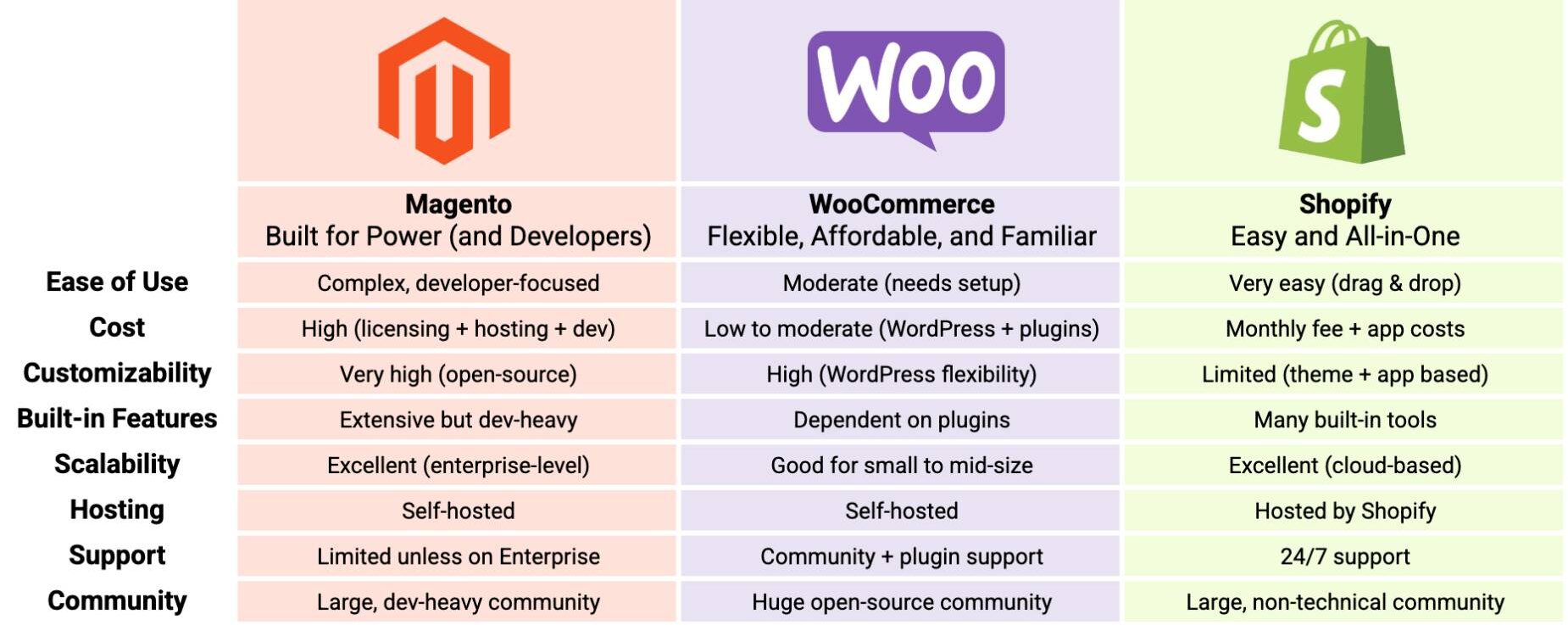
Choosing the right eCommerce platform is like picking the perfect foundation for your business—it needs to match your budget, goals, technical ability, and future growth. In this post, we break down the pros and cons of three major players: Magento, WooCommerce, and Shopify, across key categories like cost, customization, scalability, and support.

Platform Comparison Overview


Magento: Built for Power (and Developers)

Magento is known for its flexibility and enterprise-ready infrastructure. If you need advanced custom features, product catalogs in the thousands, or have in-house developers (or a big budget for an agency), Magento might be for you.
Pros:

  • Fully customizable and scalable
  • Great for large, complex product catalogs
  • Robust enterprise integrations

Cons:

⚙️ WooCommerce: Flexible, Affordable, and Familiar

WooCommerce is a plugin that turns your WordPress website into a fully functioning eCommerce store. It’s ideal for small to mid-sized businesses who want control without the overhead of enterprise platforms.

✅ Pros:

  • Low cost of entry
  • Highly customizable with plugins and themes
  • You own your site and data

❌ Cons:

  • Requires more setup and updates
  • Plugin conflicts can cause issues
  • Hosting and maintenance are your responsibility

Shopify: Easy and All-in-One

Shopify is a great choice for those who want to start selling quickly with minimal setup. It’s a hosted platform, which means Shopify takes care of the technical side so you can focus on products and sales.

✅ Pros:

  • Super easy to use
  • Fast setup with great support
  • Lots of themes and built-in tools

❌ Cons:

  • Limited customization beyond apps
  • Monthly subscription fees can add up
  • Less control over site data and hosting

Final Thoughts

Magento is best for: Enterprise-level businesses with complex needs and in-house dev teams
WooCommerce is best for: Growing businesses that want full control and flexibility
Shopify is best for: Startups or small shops wanting quick setup and ease of use

At NDIC, we love helping clients pick the right platform for their goals or assisting with migrations from one CMS to the other. If you’re unsure which one fits your business, let’s talk.

“”

Why Website Backups Matter More Than You Think

Website Backups: The Safety Net Most Businesses Forget Until It’s Too Late

Imagine waking up one morning to find your website offline, compromised, or completely erased—no pages, no images, no leads. It’s more common than most businesses think. From plugin conflicts and malware to accidental deletions or hosting errors, websites are surprisingly vulnerable. And yet, many businesses don’t take regular backups seriously—until it’s too late.

At NDIC, we’ve seen firsthand how devastating it can be to lose a site without a recent backup in place. That’s why website backups are a foundational part of our Managed WordPress Hosting and our Repair Assurance protection plan. Here’s what every business owner needs to know about backups—and how to stay protected.

Why Are Website Backups So Important?

1. Accidents Happen

When multiple people—clients, content editors, or developers—are making changes on the same website, a single mistaken click can overwrite a database or delete crucial files. Having a reliable backup lets you restore your site to a working version with minimal downtime.

2. Cyber Threats Are on the Rise

Websites face increasing threats from malware, brute-force attacks, and phishing schemes. A compromised website can damage your brand and cost you leads or revenue. With a secure backup, you can isolate and remove the threat, then quickly restore a clean version of your site.

3. Updates Aren’t Always Safe

While regular updates are essential for WordPress security and performance, they sometimes break themes or plugins. Having a backup allows you to confidently update your site—knowing you can roll back instantly if something goes wrong.

4. Peace of Mind

A good backup strategy doesn’t just protect your website—it protects your reputation, your data, and your ability to do business online.

How Often Should You Back Up Your Website?

For most business websites, daily backups are ideal. If you’re running an eCommerce store, publishing frequent content, or capturing leads through forms, losing even a day of data can have a serious impact.

Make sure your backup system:

  • Stores backups off-site (not just on the same server)
  • Keeps multiple restore points (not just the latest version)
  • Allows for easy restoration with minimal technical steps

If your current provider doesn’t offer these options—or you’re not sure—NDIC can help audit your setup and recommend the best path forward.

NDIC’s Two‑Layer Safety Net

Managed Hosting: Built for Security and Stability

Unlike basic hosting providers, NDIC’s Managed WordPress Hosting includes:

  • Automated daily backups
  • Secure servers optimized for WordPress
  • Ongoing plugin and theme updates
  • Monitoring and support from our expert team

Combined with our Repair Assurance plan, this is a powerful one-two punch against the most common causes of website failure.

Our Unique Repair Assurance Plan

If your website is ever hacked or compromised, most developers charge hundreds (or thousands) of dollars to manually repair it. That’s where NDIC’s Repair Assurance comes in. For a modest monthly fee, you’re covered.

With Repair Assurance:

  • We monitor your site for unusual activity.
  • If your site gets hacked or broken, we fix it—at no additional cost.
  • We ensure recent, working backups are always available.

This service is ideal for businesses who want peace of mind and can’t afford unexpected web emergencies. Learn more about Repair Assurance here.

Ready to Fortify Your Website?

Neglecting backups is like driving without insurance—it works until it doesn’t. NDIC’s Secure Managed WordPress Hosting and Repair Assurance provide the layered protection modern businesses need.

Contact us today for a free consultation and stop gambling with your website’s future.

AI Trends for Business: What’s Next and How to Prepare

Artificial Intelligence continues to reshape the way businesses operate, communicate, and grow—and 2025 is proving to be a turning point. If 2023 and 2024 were about experimenting with AI tools, this year is about strategically embedding AI into everyday workflows. From autonomous agents to voice interfaces and intelligent personalization, AI is moving from support role to co-pilot.

At NDIC, we’ve consistently guided our clients through technology shifts, from custom programming and web design to managed WordPress hosting and specialized AI integrations. Now, let’s dive into the most significant AI trends reshaping the business landscape, and how your company can stay ahead.

1. Agentic Workflows: AI That Thinks Ahead

As covered in our earlier post AI Agents vs. LLMs, agentic workflows represent the next evolution in AI-driven productivity. Unlike traditional large language models (LLMs), which respond directly to queries, agentic workflows empower AI systems to autonomously identify tasks, prioritize workflows, and proactively offer solutions.

In practice, imagine AI assistants not just scheduling meetings but anticipating the need for follow-up actions or additional resources, effectively streamlining operations.

How to prepare:
Businesses should start mapping workflows that could benefit from intelligent task automation. At NDIC, we can help you identify high-leverage areas for AI agents and custom-build integrations tailored to your business systems.

2. AI Voice Will Be the New Customer Interface

While chatbots have become commonplace, AI-powered voice technology is now on the rise. Voice interaction offers more natural, engaging experiences, enabling deeper customer connections and enhancing accessibility. This is especially transformative in customer service, where rapid, personalized responses can significantly elevate user satisfaction.

Imagine a customer visiting your site and asking questions out loud instead of typing, getting immediate, accurate answers through voice. This is where we’re headed, especially for mobile-first audiences and industries like healthcare, finance, and customer support.

How to prepare:
Implementing such technology, demands thoughtful integration into your existing platforms. Our specialized team at NDIC ensure smooth incorporation of advanced voice capabilities into your digital infrastructure.

3. Personalized Commerce: Hyper-Individualization with AI

Personalization has long been a cornerstone of successful marketing, but AI is taking this to unprecedented levels. Today’s AI algorithms analyze vast amounts of user data in real-time, creating hyper-personalized experiences tailored to individual preferences. While traditional recommendation engines were limited to “customers also bought,” today’s systems can understand mood, urgency, and intent. For eCommerce brands, this could mean a massive lift in average order value and retention.

How to prepare:
eCommerce sites should start layering in AI-based personalization features, especially on product and checkout pages. NDIC offers custom programming services to help integrate intelligent personalization into WooCommerce, or custom storefronts.

4. Navigating Security Risks in the Age of AI

As AI capabilities grow, so do security risks. From data breaches to AI-driven phishing scams, businesses face increasingly sophisticated threats. AI-generated content can mimic authentic communications, making traditional security measures less effective. Furthermore, the very AI systems businesses employ may become targets for exploitation or manipulation.

We’ve written about one aspect of this in AI’s Hallucinations: Identify and Prevent Them, but the broader conversation is about AI governance and data security.

Security preparation must now include AI-aware strategies, such as employing advanced anomaly detection powered by AI itself. Educating your team about emerging threats and adopting a security-first approach to AI integrations is crucial.

How to prepare:
NDIC can help you implement safer AI practices, from content validation and user controls to security-hardening your WordPress environment with managed hosting and plugin reviews.

Essential WordPress Plugins for Security

5. Your Website Needs to Be AI-Ready

As search engines like Google and Bing evolve into AI-powered answer engines, your website must be structured, schema-rich, and semantically clear to stay visible. This aligns with our insights in Staying Visible in the Age of AI Search.

It’s no longer enough to have content—it must be machine-readable, trustable, and fast. AI tools rely on structured data, clear page hierarchy, and internal consistency to determine what gets surfaced in answer-based search.

How to prepare:
Let us run an SEO and AI-readiness audit of your site. We’ll identify weak spots and upgrade your schema markup, content structure, and performance settings to help your business stay visible in AI-driven search results.

How Much Is Magento Really Costing Your Business?

Magento has long been a popular choice for eCommerce platforms, known for its robust features and scalability. But have you considered what Magento is actually costing your business beyond the surface price? Hidden expenses in licensing, hosting, development, security, and maintenance updates could be impacting your profitability.

Let’s break down the real costs and explore a more budget-friendly alternative: WooCommerce.

Licensing Fees: The Hidden Expense

Magento offers two primary versions:

  • Magento Open Source (formerly Magento Community Edition) – free
  • Magento Commerce (formerly Magento Enterprise Edition) – it carries significant licensing fees, typically starting around $22,000 per year. For growing businesses, these costs can quickly escalate, consuming resources that could otherwise boost your marketing or product development.

WooCommerce, by contrast, is an open-source platform with no licensing fees. Built as a WordPress plugin, WooCommerce allows you to redirect those licensing fees into areas that directly enhance your business growth.

Hosting Costs: Not So Straightforward

Magento is resource-intensive, often requiring dedicated hosting environments or cloud-based solutions like AWS, Google Cloud, or Azure. Monthly hosting fees range significantly but often start around $500 per month, scaling quickly depending on site traffic and performance demands.

WooCommerce hosting, however, is more cost-effective. Quality managed WordPress hosting solutions like the ones we provide and NDIC start at $29.95 per month, offering excellent performance at a fraction of Magento’s cost.

Development Hours: Complexity Equals Higher Costs

Magento’s complexity can significantly increase your development costs. Customizations, integrations, and routine maintenance generally require experienced Magento developers, who charge higher hourly rates. This translates into thousands of dollars annually.

WooCommerce, meanwhile, boasts a user-friendly environment with easier customizations. Because WooCommerce developers are abundant, competitive rates typically are available under $200 per hour, considerably reducing ongoing development expenses.

Pro Tip: Two of NDIC’s managed hosting plans include content updates for half an hour, an hour that you can use towards website updates, questions, troubleshooting, etc.

Security Patches: Critical but Costly

Magento regularly releases critical security patches, requiring immediate application to protect your store from vulnerabilities. Each security patch can necessitate significant developer hours, adding unexpected costs and potential downtime to your business.

WooCommerce’s security patches and updates are generally less intrusive and easier to manage, particularly when using managed hosting solutions that include automatic updates and built-in security enhancements.

Maintenance and Update Burdens

Maintaining Magento involves regular updates, patches, and version upgrades. Due to Magento’s complexity, these updates can lead to compatibility issues, downtime, and additional development time, further increasing costs.

WooCommerce updates, by contrast, are simpler and quicker, especially with WordPress’s intuitive user interface and automated update options. This ease of management helps minimize unexpected disruptions and costs, allowing you to focus more on your core business.

Is It Time to Consider WooCommerce?

Magento is undoubtedly powerful, but its hidden costs—licensing, hosting, complex development needs, security patches, and burdensome updates—can quickly drain resources better invested elsewhere.

WooCommerce provides a robust yet cost-effective alternative, empowering businesses with flexibility, ease of use, and significantly lower total costs.

Ready for a Change?

At NDIC, we can assist with a seamless migrations from Magento to WooCommerce, ensuring minimal downtime and maximum performance. Let us help your business make the transition smoothly and affordably.

Contact us today and learn more about how WooCommerce can streamline your eCommerce operations and boost your profitability.

How Small Businesses Can Start Using AI Today

AI Isn’t Just for Big Tech Anymore

When most people hear “artificial intelligence,” they picture massive companies like Google, Amazon, or Tesla. But the truth is, AI tools are now more accessible than ever—and small businesses can start using AI today to save time, improve customer service, and boost sales.

You don’t need a huge budget or a dedicated data team. You just need the right tools and a little help setting them up—and that’s where NDIC comes in.

What Can AI Do for Small Businesses?

AI isn’t some mysterious technology that only data scientists understand. Today’s AI tools are user-friendly and highly customizable. Here are just a few ways small businesses are using AI right now:

✅ 1. Automate Customer Responses with AI Chatbots

AI-powered chat clients can answer frequently asked questions 24/7, book appointments, guide users to the right product or service, and even qualify leads. You can think of them as your always-on support team.

We explained how these bots work in our blog post: AI-Powered Chatbots: A Game-Changer for Your Business

If you’re not ready for a full support bot, you can start small—automate responses for common questions like hours, pricing, or return policies.

✅ 2. Streamline Internal Tasks and Routing

AI isn’t just for customer-facing interactions. It can also be used behind the scenes to:

  • Route tasks to the right team member
  • Summarize emails or support tickets
  • Prioritize high-value leads
  • Automate repetitive admin tasks

With custom AI programming, we can help you build these workflows right into your website or internal tools, tailored to how your business actually operates.

AI Use Cases That Deliver Real Value

Data Analysis Without a Data Team

You don’t need to be a data scientist to get insights from your business data. AI can help you spot trends in customer behavior, sales cycles, or inventory usage—and present it in a simple, readable format.

Need help identifying what kind of data you should be looking at? Our custom AI solutions can be designed to track and summarize exactly what matters to you.

Marketing Smarter, Not Harder

AI can also help with:

  • Writing emails and blog posts
  • A/B testing ad campaigns
  • Segmenting customers for better targeting
  • Recommending the best time to post or send emails

These tools are often built into platforms you’re already using, and we can help you connect the dots or extend their power with custom integrations.

Explore more in our post: Smarter Chatbots in 2025: Beyond RAG with New AI Solutions

Getting Started: You Don’t Have to Do It Alone

At NDIC, we help small and mid-sized businesses make AI simple. Here’s what we can do:

  • Install and customize AI chat clients on your website
  • Create tailored AI workflows for your operations
  • Integrate AI into your marketing or analytics tools
  • Build custom AI tools to solve specific problems

We start by listening to what you need—no pressure, no jargon. Whether you want to save time, close more sales, or just reduce support requests, we’ll help you find the right approach.

And we always make sure your AI tools work seamlessly with the rest of your website.

Concerned About AI Accuracy?

We understand. That’s why we also wrote AI’s Hallucinations: Identify and Prevent Them, where we explain how to keep your AI reliable and accurate.

Spoiler: With the right setup and safeguards, it’s easy to avoid misleading results and maintain trust with your customers.

Final Thoughts: The Future Is Small (and Smart)

AI isn’t just a trend—it’s a powerful tool that small businesses can harness right now. You don’t have to wait until your company gets bigger, or more technical.

You just need a smart plan, the right partner, and a willingness to start.

Contact NDIC to learn how we can help you use AI to grow your business—today.

How to Protect Your Store and Customers against Fraud

For online stores built with WooCommerce, staying one step ahead of fraudulent activity is not just about protecting your revenue—it’s also about safeguarding your customers’ trust and your brand’s reputation.

While WooCommerce is a powerful and secure platform, no system is entirely immune to the growing tactics of online fraud. The good news? There are clear and proactive steps you can take to prevent fraud and respond effectively if it happens.

In this post, we’ll walk you through what WooCommerce fraud looks like, how to prevent it, and how NDIC can help ensure your store stays safe and successful.

What Is WooCommerce Fraud?

Commerce fraud refers to unauthorized or deceptive activities in an online store, typically targeting transactions, customer data, or payment methods. In WooCommerce, this can take several forms, many of which can be automated by bots or carried out manually by individuals with malicious intent.

It’s important to note that fraud prevention isn’t about being suspicious of every shopper—it’s about creating smart systems that reduce your store’s vulnerability without hurting the user experience.

Common Types of WooCommerce Fraud

Here are some of the most frequent types of fraud WooCommerce store owners may encounter:

1. Chargeback Fraud (Friendly Fraud)
A customer purchases a product or service, receives it, and then disputes the charge with their credit card provider to get a refund—effectively getting the product for free.

2. Identity Theft
Stolen credit card information or personal details are used to make unauthorized purchases.

Phishing or Spoofing Scams
Fake checkout pages or emails are designed to trick customers into sharing their payment details.

3. Card Testing
Fraudsters use WooCommerce sites to test the validity of stolen credit cards by making small transactions before launching larger fraud attempts elsewhere.

4. Automated Bot Attacks
Bots attempt login brute-force attacks or automatically place fake orders, sometimes overwhelming your system or inflating metrics.

How to Prevent WooCommerce Fraud

Prevention is all about having the right tools, processes, and awareness in place. Here are effective strategies WooCommerce store owners can implement:

1. Use Secure Payment Gateways

Choose payment processors like Stripe, PayPal, or WooPayments. These providers offer built-in fraud protection tools, such as machine-learning detection systems and automatic dispute resolution support.

2. Enable Strong Security Plugins

Install trusted security plugins like:

  • iThemes Security – This is our go to plugin in NDIC.
  • Wordfence Security
  • Sucuri Security

These can help block suspicious activity, scan for malware, and limit login attempts.

3. Add CAPTCHA and Rate Limiting

Protect your checkout and login pages from bots using Google reCAPTCHA and rate-limiting plugins to stop brute-force attacks.

4. Use Anti-Fraud Plugins

Consider plugins such as:

  • FraudLabs Pro
  • WooCommerce Anti-Fraud by YITH
  • Stripe Radar (built into Stripe)

These tools evaluate transaction risk based on geolocation, IP behavior, billing/shipping mismatches, and more.

5. Monitor Unusual Order Patterns

Train your team to flag:

  • Very large orders from new customers
  • Mismatched billing/shipping details
  • Unusually fast repeat purchases

Responding quickly can often stop fraudulent transactions before they’re fulfilled.

6. Keep Software Updated

Always run the latest version of WooCommerce, WordPress, and your plugins. Updates often include important security patches.  Let us know if we can help with our NDIC plugin reliability review to ensure optimal site health.
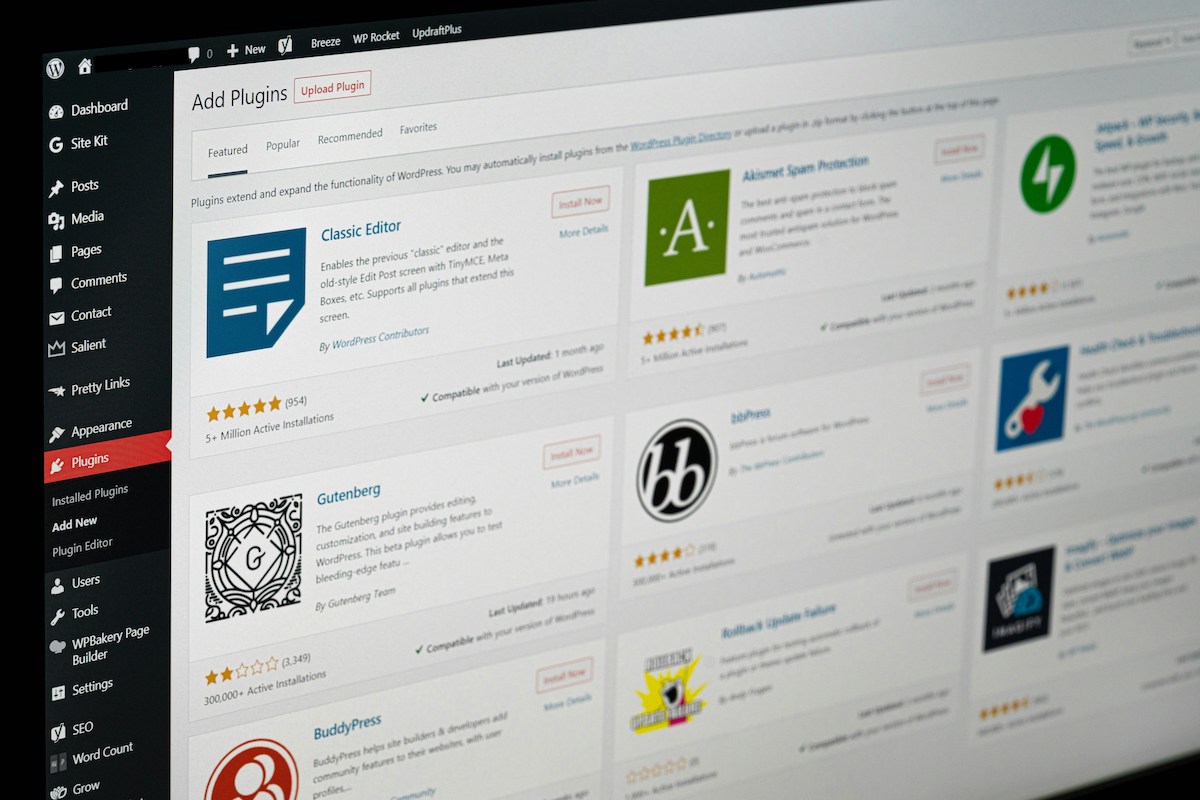
The Best WordPress Plugins

What to Do If Fraud Happens

Even with the best tools in place, fraud can still occur. Here’s how to respond:

Document Everything
Keep order logs, emails, and shipping information organized in case you need to dispute a chargeback or investigate further.

Contact Your Payment Processor
If fraud is suspected, reach out to Stripe, PayPal, or your provider immediately to flag the transaction and take the appropriate steps.

Temporarily Disable Checkout (if needed)
In case of a large-scale bot attack or spike in fraud, you may need to temporarily disable checkout to prevent further harm.

‍ Work With a Web Partner
At NDIC, we help clients assess and secure their WooCommerce stores—whether through plugin audits, hosting management, or setting up fraud detection layers.

How NDIC Can Help

At NDIC, we don’t just build WooCommerce sites—we maintain and protect them. Our managed WordPress hosting and WooCommerce development services include:

  • Plugin and security audits
  • Payment gateway optimization
  • Real-time monitoring and backups
  • Custom fraud prevention workflows

We help our clients stay proactive, not reactive, so fraud never derails their business goals.

Fraud prevention isn’t about locking down your WooCommerce store and creating barriers for genuine customers—it’s about building a smart, secure environment that protects everyone involved. With the right setup and effective support, you can reduce risk, respond quickly, and keep your store running smoothly.

Here is another article you can read about the the best security practices for your WooCommerce website.

Want to know how secure your store really is? Let’s take a look together. 

Contact NDIC to schedule a WooCommerce security review.

AI Agents vs. LLMs: What They Are and How They Help Your Business

Understanding AI Agents: What They Are and Why They Matter

As AI continues to evolve, terms like “LLMs” and “AI agents” get tossed around a lot. But what do they actually mean for your business?

In this article, we break it down simply: how AI agents differ from standard large language models (LLMs), how they can be connected to your systems, and how NDIC’s Chat AI can bring these benefits directly to your website.

What Is an AI Agent?

An AI agent is more than just a chatbot or a tool that talks back. It’s a smart assistant that:

  • Understands user input
  • Plans actions based on specific tasks
  • Accesses data or tools in real-time
  • Returns relevant and goal-oriented responses

Think of it like a virtual employee who doesn’t just respond with information, but knows when to ask questions, how to take actions, and how to guide users toward completing specific tasks.

How Is This Different from an LLM?

An LLM (Large Language Model) like GPT-4, Gemini or Claude is trained to generate human-like text based on patterns. It’s very good at answering questions and having conversations—but on its own, it’s not task-driven or integrated into your specific workflows.

An AI agent, on the other hand, uses an LLM as a brain, but adds a layer of logic and structure:

  • It can access external systems (like your CRM or calendar)
  • It can make decisions based on your data and business rules
  • It’s trained not just on language, but on objectives and context

In other words, an AI agent is like giving an LLM a job description, tools, and instructions.

Introducing NDIC’s Chat AI: Your Business Agent

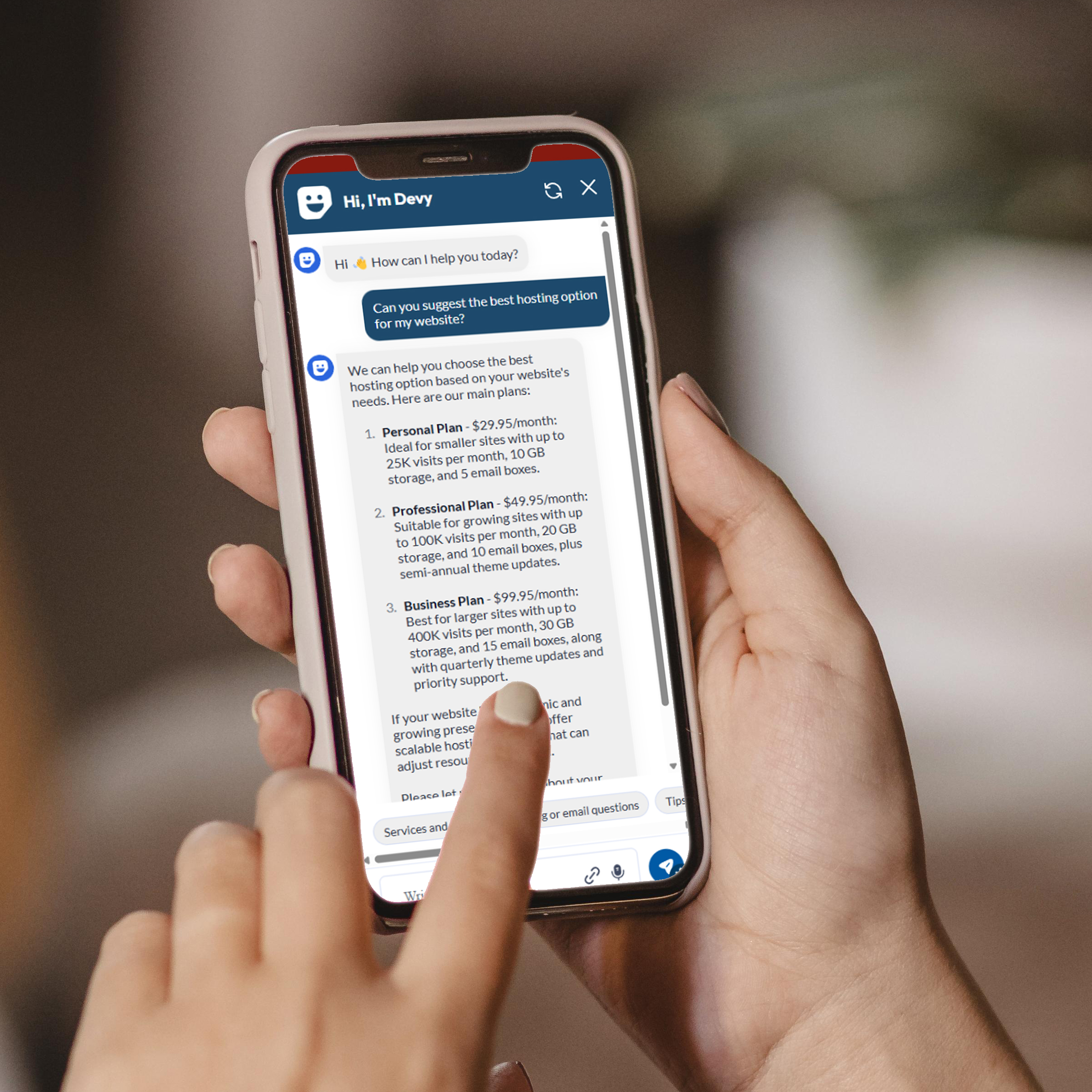
At NDIC, we work with Chat AI—a customizable AI chatbot solution designed to act like a smart, friendly front-line agent for your website.

It can be connected to one or multiple LLMs (such as Gemini, Chat GPT or Claude), depending on your needs and privacy requirements. But what makes Chat AI special is how we tailor it for your business.

Here’s what we help you with:

  • Setup and integration on your WordPress
  • Personalization of tone, answers, and workflows
  • Connection to external tools like FAQs or support documentation
  • Testing and refining the agent to behave like a helpful member of your team

 Test this tool in the right lower right corner of our site or give us a call if you are ready to get started. 

How AI Agents Can Make Business Life Easier

AI agents can assist in many ways, saving time and improving user experience. Here are just a few examples:

1. Customer Support (24/7)

Chat AI can answer common customer questions—order tracking, product info, pricing, support hours, and more—without human intervention.

2. Lead Qualification

Instead of sending everyone to a contact form, Chat AI can ask a few qualifying questions and then pass the hot leads to your sales team.

3. Appointment Booking

Integrate Chat AI with your scheduling software so users can book meetings directly from a chat window.

4. Internal Tools

AI agents can also be used internally by employees to search company knowledge bases, pull reports, or guide onboarding steps.

5. Ecommerce Support

Guide users to the right product based on preferences, answer questions about shipping and returns, or upsell with smart suggestions.

Let’s Build an AI Agent for Your Business

AI agents are no longer a futuristic concept—they’re already helping businesses respond faster, reduce support costs, and improve engagement.

Whether you’re just curious about what’s possible or ready to take the leap, NDIC is here to help. With our experience in custom development, WordPress, WooCommerce, and AI integration, we can create a solution that truly fits your brand.

Let’s talk about what a smarter, task-driven chatbot could look like for your website. We’re just a message away.

Smarter Chatbots in 2025: Beyond RAG with New AI Solutions

Conversational AI has advanced rapidly, offering businesses more intuitive ways to communicate with users through chatbots and virtual assistants. One of the most talked-about methods in recent years has been RAG (Retrieval-Augmented Generation), which improves chatbot responses by fetching relevant documents to support its answers.

But what if your business needs something beyond what RAG can offer?

In this article, we explore RAG alternatives like KAG (Knowledge-Augmented Generation), CAG (Cache-Augmented Generation), and more advanced strategies like instruction fine-tuning and RLHF (Reinforcement Learning with Human Feedback). We’ll also show how NDIC helps you integrate these technologies seamlessly to build more intelligent, brand-aligned AI tools.

What is RAG and Why Look for Alternatives?

RAG combines a language model with a search mechanism. Before generating a response, it retrieves documents from a knowledge base or dataset, which are then used to ground the chatbot’s answer. While effective for many cases, RAG has its limitations:

  • It depends on the quality of the retrieval system.
  • It can be slower due to multiple steps.
  • It may still hallucinate if retrieval fails or returns incomplete data.

To overcome these challenges, newer models and techniques have emerged, offering improved accuracy, speed, and flexibility.

1. KAG (Knowledge-Augmented Generation)

KAG takes RAG a step further by tightly integrating curated, domain-specific knowledge into the generation process. Instead of querying a search system each time, KAG includes structured or semi-structured knowledge (like FAQs, internal wikis, or product databases) directly in the model’s memory or context window.

Use Case Example:
For a customer support chatbot in the insurance industry, KAG can help deliver quick, compliant answers by pulling directly from internal policy manuals or regulatory documents.

2. CAG (Cache-Augmented Generation)

CAG leverages previously asked questions and their responses by storing them in a cache. When a similar question arises again, the model references that previous answer instead of generating a new one from scratch.

Use Case Example:
For eCommerce businesses, this can drastically speed up responses to common queries like return policies, shipping costs, or order tracking.

3. Instruction Fine-Tuning

Rather than modifying data retrieval or memory systems, this method teaches the AI to follow specific instructions better. It involves training the model on example prompts and desired responses aligned with your business goals.

Use Case Example:
For a nonprofit’s donation chatbot, instruction tuning helps the bot clearly guide users through the process, explain tax-deductible options, and avoid giving off-topic or unhelpful responses.

4. RLHF (Reinforcement Learning with Human Feedback)

This cutting-edge approach helps AI align with human preferences by letting real people evaluate responses and guide the model during training. It results in more helpful, less biased, and safer AI behavior.

Use Case Example:
If you’re running a telehealth platform, RLHF can help ensure your AI prioritizes empathy, clarity, and accuracy when discussing sensitive topics.

Which One is Right for You?

Choosing the best approach depends on your business needs, user expectations, and available data. Some clients benefit from a hybrid model combining two or more of the above techniques.

That’s where NDIC comes in. We don’t just offer off-the-shelf solutions—we listen to your goals, evaluate your systems, and guide you through building custom AI that enhances productivity, saves time, and feels like a real member of your team.

Let’s Build the Smarter AI Your Business Deserves

If you’re curious about implementing conversational AI but unsure where to start, NDIC is here to help. Our experts can audit your current systems, recommend the right architecture, and build secure, scalable tools that align with your brand.

Reach out today and let’s explore how AI can work smarter for you.

Boost Sales with Smarter Cross-Selling and Upselling in 2025

What Are Cross-Selling and Upselling?

Cross-selling and upselling are essential strategies for any eCommerce business looking to boost revenue without attracting new customers. Instead of focusing on more traffic, these techniques focus on increasing the average order value by encouraging customers to purchase additional or upgraded products.

  • Cross-selling offers complementary items. For example, if someone buys a camera, the site suggests a memory card or tripod.
  • Upselling recommends a higher-end version of the product they’re already interested in.

Both techniques are subtle but powerful when done correctly. And in WooCommerce, they’re not just effective—they’re easy to implement.

Why Are These Strategies Important in 2025?

As online shoppers become savvier and digital ad costs continue to rise, converting existing traffic more effectively is critical. In our previous article, “Optimizing WooCommerce Product Pages for Conversions“, we discussed the importance of great product design and usability. Cross-selling and upselling take that optimization a step further.

By integrating these techniques directly into the customer journey, businesses can:

  • Improve user experience with relevant suggestions
  • Increase cart value without aggressive sales tactics
  • Promote lesser-known or newer products

Tips for Smarter Cross-Selling and Upselling

Here are a few simple yet effective ways to implement these strategies:

  1. Show Related Products on Product Pages. Use WooCommerce’s built-in features to recommend products that are frequently bought together or logically complement the main item. For example, selling a laptop? Suggest a wireless mouse, sleeve, or external keyboard.
  2. Add Upsell Options at Checkout. Customers already committed to a purchase may be open to upgrading. Prompt them with a “You may also like” or “Upgrade your order for just $X more” message.
  3. Use Personalized Recommendations. Based on browsing history or previous purchases, recommend products tailored to each user. This builds trust and shows the customer you understand their preferences.
  4. Bundle and Save. Offer bundles of complementary products at a discount. This not only increases order value but gives the impression of better value.
  5. Use Visual Cues. Show star ratings, badges like “Best Value” or “Top Seller,” and brief comparison points to guide users toward higher-value products.
  6. Test and Optimize. Just like we recommended in “Top UX Best Practices for 2025 Web Design“, regularly test different layouts and recommendations to see what performs best.

How NDIC Helps eCommerce Clients Succeed

At NDIC, we specialize in helping businesses make the most of WooCommerce by tailoring strategies to your products, audience, and goals. Our team can:

  • Audit your product page layouts and identify optimization opportunities
  • Design smart upsell/cross-sell placements that match your branding
  • Set up dynamic product recommendation tools
  • Create bundles, pricing tiers, and checkout flows that increase conversions

Whether you’re a small business just getting started or an established store looking to scale, we can implement practical improvements that make a real difference.

Let’s Grow Your Online Store—Together

Interested in improving your average order value without increasing your ad budget? Contact NDIC today to talk about smarter product strategies, custom WooCommerce solutions, and how we can turn browsers into buyers.

We’re just a message away from helping your eCommerce site do more in 2025.

Trusted by These Great Companies

Tell us about your website needs - we’d like to hear from you!

What's New

When SaaS Stops Scaling: The Case for Custom Software

Most mid-market businesses hit the same wall around year five of growth. They've built their entire operation on top of… more

Why Most Companies Are Approaching AI Backwards (And How to Fix It)

Most companies buy an AI tool first and try to fit it into their business afterward. That order rarely works.… more

Read All