Author: Masen

How to – Locate the error_log file in cPanel

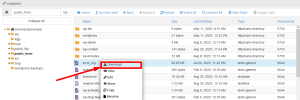
Log in to cPanel. Navigate to the “Files” Section. Once you’re logged in to cPanel, look for the “Files” section. Within the “Files” section, search for and click on the option “File Manager“. This tool will allow you to explore and manage your website’s files. Once you’re in the “File Manager“, you should access the […]

How to – Change my MX Records in cPanel

Access you cPanel account. Managing Your Domain. Go to the “Domains” section. Here, find and click on the “Zone Editor” menu. Locate your domain in the list and click on the “Manage” option next to it. Navigating to MX Tab. Once in the management section, look for and click on the “MX” tab. Removing Existing […]

The Totalitarian Regime that is Google Safe Browsing

The Google Safe Browsing team has done a great job helping prevent the spread of malware but for those of us trying to fight malware in the trenches by cleaning sites and putting them back into service, Google is more like a totalitarian regime than a system of fair governance. Let me explain why it feels that way.

New Year Resolution: Add E-commerce to Your Online Presence

The Benefits of Custom WooCommerce Development

Over the past year we have seen some major shifts in how people are shopping. According to Shopify, who surveyed 11 markets, 84% of consumers shopped online during the pandemic.¹ With more people sheltering in place and staying home, it’s not surprising that most people decided to shop online. This includes everything from groceries to […]

6 ways to increase website conversions for the holidays

Are you ready for the holidays? With so many people shopping from home this year, it’s sure to be a record breaking year for online sales. We have 6 tips to help ensure your website is ready.

NDIC Acquires Impulse Advanced Communications Web Hosting Business

Santa Barbara, CA, November 16, 2020 – New Directions in Computing (NDIC) is pleased to announce the acquisition of Impulse Advanced Communications’ web hosting business, beginning mid-November. For 25 years, Impulse has offered the central coast a suite of local services including internet access, web/email hosting, and telecom services. The business has decided to discontinue […]

5 free courses that will make you better at WordPress

WordPress Admin on the laptop screen

WordPress can be overwhelming at first glance. To help you feel more comfortable using it, we have compiled a list of five free resources to help you get better at mastering the most popular content management system.

Website ADA Compliance

website with accessibility features on a laptop

Lawsuits targeting businesses with websites that are allegedly not ADA Compliant are on the rise. This trend started a few years ago and the first round of suits were filed against large companies like Dominoes and WinDixie, claiming that their websites were inaccessible to people with disabilities. Courts have upheld these claims, leading to a rash of new lawsuits. In fact, these types of cases have rapidly grown in the last few years from 815 in 2017 to over 3200 in 2019.

The Difference Between a $500 Website and a $5000 Website

It is certainly possible to find a web developer who will build you a $500 website. And that may be all that you or your business needs for the moment. But don’t be talked into thinking that you will be getting the same website that you would get if you paid $5000.

WordPress vs Webflow, Wix & Squarespace

WordPress Admin on the laptop screen

One of the fundamental differences between WordPress and the other platforms mentioned here. WordPress is freely available software that you can download and customize to whatever degree you want and host wherever you want. You are literally given the source code to WordPress which means you have full access to everything happening behind the scenes and “under the hood.” For all intents and purposes, this means that you own your site and have total control over its destiny.  Proprietary systems require that you pay them a fee to host your site on their platform.

Trusted by These Great Companies

Tell us about your website needs - we’d like to hear from you!

What's New

Magento to WooCommerce Migration, Done Faster with AI

*"Magento™ and WooCommerce™ are trademarks of their respective owners. Most Magento store owners we talk to aren't asking if they… more

Your Website's New AI Coworker: Are You Ready?

Most conversations about AI and websites focus on one of two things: how AI is changing search results, or how… more

Read All