Everything you need to know about WordPress Themes

At NDIC, a leading and experienced WordPress company, we understand the importance of selecting the right theme for your website. Your choice of theme can significantly impact your site’s performance, appearance, and user experience. This comprehensive guide will cover everything you need to know about WordPress themes, from their types and features to customization options and best practices.

Before we get started.. What are WordPress Themes?

A WordPress theme is a collection of templates and stylesheets used to define the appearance and display of a WordPress-powered website. Themes can be added, removed, or changed at any time without affecting the content or structure of your site. They provide a flexible way to alter the look and feel of your site without needing extensive coding knowledge.

Types of WordPress Themes

1. Free Themes:

Free themes are available in the WordPress theme repository. They are a great starting point for beginners or those on a tight budget. However, free themes often come with limited features and support.

2. Premium Themes:

Premium themes, available from marketplaces like ThemeForest and Elegant Themes, offer more advanced features, regular updates, and dedicated support. They are ideal for businesses looking for a professional and polished appearance.

3. Custom-Made Themes:

Custom-made themes are designed specifically for your website. They offer complete flexibility and are tailored to meet your unique requirements. At NDIC, we specialize in custom-made WordPress themes that align with your brand identity and business goals.

While commercial themes offer a quick and affordable solution, they often fall short in the long run.


Key Features to Look for in a WordPress Theme

When selecting a WordPress theme, consider the following features to ensure it meets your needs:

1. Responsiveness:

A responsive theme adjusts its layout across different devices, ensuring a seamless user experience on desktops, tablets, and smartphones.
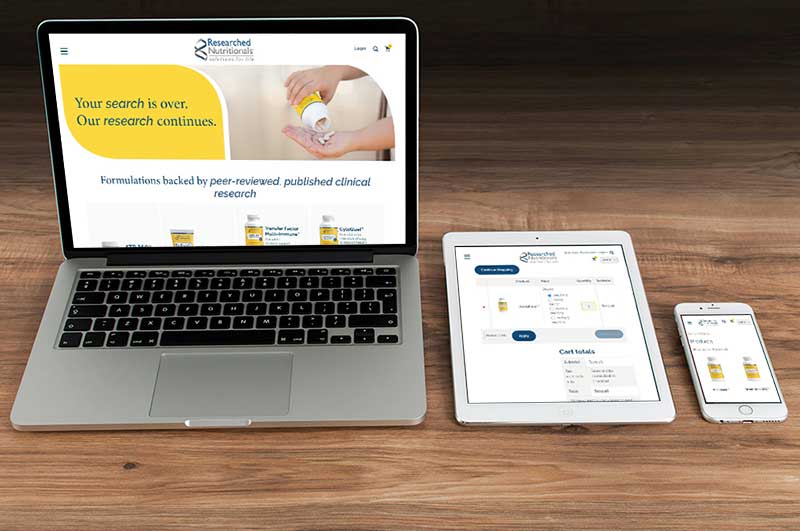
Responsive-design and mobile friendly websites

2. Customization Options and Unique looks:

Look for themes that offer customization options, such as color schemes, fonts, and layout choices. This allows you to tailor the theme to match your brand’s aesthetic. A custom theme sets you apart. We work closely with you to understand your brand identity, target audience, and desired user experience. This translates into a website that’s truly unique, reflecting your brand’s personality and values. Think of it as your virtual flagship store, designed to attract and engage your ideal customers.

Commercial themes are often packed with features, many of which you might never use. This can lead to a cluttered and confusing user experience. A custom theme focuses on the functionalities that truly matter to your business. Do you need a robust eCommerce platform? A reservation system for your restaurant? A membership portal? We custom build these functionalities seamlessly into your theme, ensuring your website works exactly the way you envisioned.

3. SEO-Friendly:

An SEO-friendly theme is crucial for improving your site’s visibility on search engines. Ensure the theme follows best practices for SEO, such as clean code, fast loading times, and mobile optimization. While some commercial themes may boast SEO-friendliness, it’s often a one-size-fits-all approach. A custom theme gives you complete control over your website’s structure and code, allowing for optimal SEO implementation. We integrate best practices to enhance search engine visibility, helping your target audience find you more easily.

4. Compatibility with Plugins:

Ensure the theme is compatible with popular WordPress plugins like Yoast SEO, WooCommerce, and Contact Form 7. This will enhance your site’s functionality without the need for extensive development work.

5. Regular Updates and Support:

Choose a theme that is regularly updated to keep up with the latest WordPress versions and security patches. Reliable support is also essential for troubleshooting any issues that may arise. With commercial themes, you’re often left to troubleshoot issues on your own. At NDIC, we believe in long-term partnerships. Our WordPress experts provide ongoing support, ensuring your website remains functional and secure. We’re always here to answer your questions, address any technical problems, and offer guidance as your website evolves.

6. Scalability for Future Growth:

Your website should grow alongside your business. Commercial themes might struggle to adapt to your evolving needs. A custom theme is built with scalability in mind. We consider your future goals during the design process, ensuring the theme can accommodate new features, functionalities, and content seamlessly.

The Custom Advantage: A Lasting Investment

Sure, a commercial theme might seem like a budget-friendly option initially. However, the limitations, lack of customization, and potential future limitations often result in the need for a redesign later on. A custom theme is an investment that pays off in the long run. You’ll have a website that truly represents your brand, attracts your ideal customers, and grows with your business.

Ready to Craft Your Dream Website?

We’re passionate about creating visually stunning and functionally exceptional WordPress websites. We take the time to understand your brand, goals, and target audience to deliver a custom theme that exceeds your expectations.

Get a Quote Today!

Contact us today for a free consultation to discuss your vision and explore how we can bring it to life with a custom WordPress theme. Let’s build a website that sets you apart from the competition and fuels your business success!
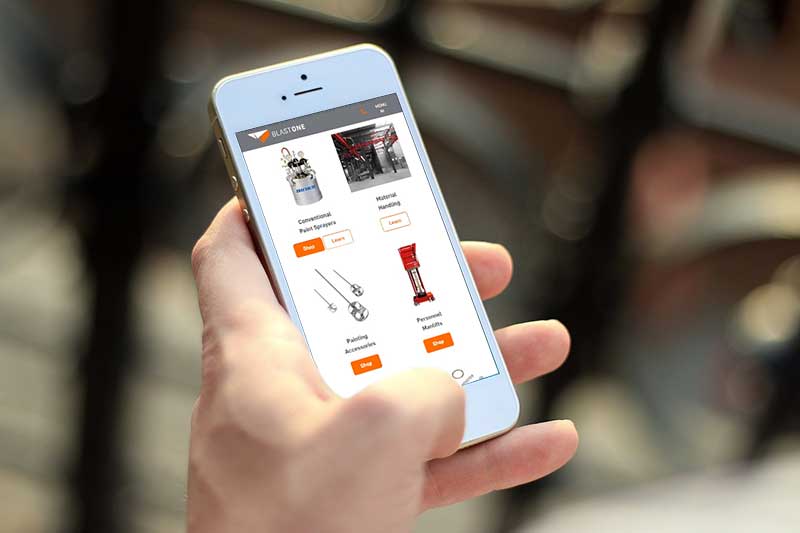

 

Responsive and Ready: The Importance of Mobile-Friendly WooCommerce Themes

Responsive-design and mobile friendly websites

The Mobile Commerce Revolution

In the era of mobile dominance, an online store’s success is intrinsically tied to its mobile-friendliness. As users increasingly turn to smartphones for their shopping needs, having a responsive and mobile-friendly WooCommerce store is no longer an option—it’s a necessity. This comprehensive guide explores the critical importance of mobile-friendly WooCommerce themes/websites, delving into why they matter, how to choose them, and the impact they can have on your online business.

I. The Mobile Shift: Why Mobile-Friendliness is Non-Negotiable

1. Mobile Shopping Trends:
In recent years, mobile shopping has witnessed an unprecedented surge. Studies show that a significant percentage of e-commerce transactions now occur on mobile devices.

2. Google’s Mobile-First Indexing:
Google’s emphasis on mobile-first indexing means that websites optimized for mobile users receive preferential treatment in search rankings.

II. The Impact of Mobile-Friendly Themes on User Experience

1. Seamless Navigation:
Mobile-friendly WooCommerce sites and responsive themes ensure seamless navigation, providing an intuitive and enjoyable user experience on smartphones and tablets, no matter the size.

2. Improved Page Load Speed:
Mobile-friendly themes are designed for quick loading, reducing bounce rates and keeping impatient mobile users engaged.

3. Optimal Product Display:
Responsive themes optimize product displays for smaller screens, ensuring that your product or service looks appealing on any device.

Increase sales with mobile website and themes

III. Choosing the Right Mobile-Friendly WooCommerce Theme

1. Theme Responsiveness:
Ensure the theme is explicitly labeled as “responsive” to guarantee adaptability to various screen sizes. If you work with us, you know that our own NDIC theme is 100% responsive and we do Quality Assurance on the website we design before the Go Live.

2. Customization Options:
If you need something more customized, you can always let us know so we make sure to provide the most efficient solution for your business.

IV. Mobile SEO: Enhancing Visibility and Rankings

1. Google’s Mobile-Friendly Test:
Utilize Google’s Mobile-Friendly Test to ensure your WooCommerce store meets the search giant’s mobile standards.

2. Mobile SEO Best Practices:
Implement mobile SEO best practices, including concise meta descriptions, mobile-friendly URLs, and optimized images. If you are interested in getting an SEO report of your website, feel free to get in touch and we will gladly help you with one.

V. Impact on Conversions and Revenue: The Bottom Line

1. Reduced Cart Abandonment:
A mobile-friendly store experience reduces cart abandonment rates by providing a smooth and hassle-free checkout process for all users.

2. Increased Sales:
Enhanced user experience on mobile leads to increased sales and revenue as more users feel comfortable completing transactions on their devices.

Future-Proof Your WooCommerce Store with Mobile-Friendly Design

In the rapidly evolving e-commerce landscape, the importance of mobile-friendly WooCommerce themes cannot be overstated. By prioritizing mobile responsiveness, you not only enhance user experience and SEO rankings but also future-proof your online store against the ever-increasing dominance of mobile commerce.

Take the leap towards a responsive and ready WooCommerce store, and watch your business thrive in the mobile era.

Your Customers Are Mobile. Is Your Store? Connect with our team to ensure your WooCommerce theme is responsive and ready for the modern shopper.

Unleash the full power of WooCommerce

You have an amazing brand, shouldn’t your website reflect that?

If you are looking for a way to better manage your online store, you might have heard of different eCommerce platforms such as Shopify, Magento, BigCommerce, and WooCommerce. But which one is the best for your needs? In most cases, the platforms mentioned above are an easy out-of-the-box solution for most small online retailers, but if you’re reading this blog, your brand and web presence need something more!

WooCommerce is the best solution for unique eCommerce needs. Having a skilled WooCommerce developer can bring significant benefits to your eCommerce store, ensuring a seamless and successful online presence. Here are some of the advantages of having a WooCommerce expert on-hand.
Unleash the full power of WooCommerce

Feature-rich online store that stands out from the crowd


  • A dedicated WooCommerce developer possesses the expertise to implement advanced features tailored to your specific business needs.
  • They can integrate plugins and extensions to enhance functionality, providing your customers with a smooth and enjoyable shopping experience.
  • Customization options can be implemented to make your store unique and stand out from the competition.

Responsive eCommerce web design that attracts and retains customers

  • A developer can create a responsive design that adapts to various devices, ensuring a consistent and user-friendly experience across desktops, tablets, and mobile phones.
  • This responsiveness is crucial for attracting and retaining customers, as more people are shopping on the go.
Collaborative development for your business

Collaborative development to create the eCommerce site tailored to your specific needs

  • Working with a developer allows for open communication and collaboration throughout the development process.
  • They can provide insights, guidance, and regular updates, ensuring that you are involved in decision-making and aware of the project’s progress.
  • A collaborative approach helps in aligning the development with your business goals and expectations.


Post-launch maintenance and advanced security that grows with your business

  • A developer can offer post-launch support, addressing any issues that may arise and ensuring the ongoing smooth operation of your eCommerce store.
  • Implementing advanced security features helps safeguard your customers’ data and protects your website from potential threats, ensuring a secure shopping environment.

Regular WooCommerce updates and support to keep your site functioning at its fullest potential

  • Staying up-to-date with the latest WooCommerce updates and upgrades is crucial for maintaining optimal performance and security.
  • A developer can handle regular backups, preventing data loss in case of unforeseen events.
  • Continuous monitoring and support ensure that your online store remains in top-notch condition, adapting to new technologies and industry standards.

In summary, having a WooCommerce developer onboard ensures a feature-rich, responsive, and secure eCommerce store. Their collaborative approach and commitment to post-launch maintenance contribute to the long-term success of your online business.

How does NDIC stack up?

Experts that take your site to the next level

Our WooCommerce experts identify what advanced features need to be implemented and if it doesn’t already exist, they create it. We’re all about thinking outside the box, tweaking plugins, and adding extensions to fit your unique needs. Case in point: we once created a super special shipping method for an international business that’s one-of-a-kind in their industry!


Web design that attracts and retains customers

With everyone shopping on-the-go these days, having a developer create a responsive design is crucial for keeping your customers happy and hooked. At NDIC, our WooCommerce experts understand user experience and the importance of having a website that’s responsive across different devices; in fact we don’t know how to design a site any other way.

Responsive website design in san luis obispo

Our experts are part of your team

When you team up with NDIC, it’s like having a buddy by your side throughout the whole project. Our experts provide insights and give you guidance. We’re not like those other platforms – we make sure you’re in the loop with regular updates. It’s more than just coding and programming; it’s a group effort. Our projects blend your business goals with our eCommerce know-how, and you know what we say at NDIC, “Teamwork makes the dream work” – we’ve been saying that before it was cool.

We have your back

Once your online shop is good to go, NDIC becomes your virtual maintenance superhero. We’re on the lookout for any hiccups, making sure everything runs like a well-oiled machine. We focus on security to ensure your customers’ info remains protected, creating a safe haven for shopping. We don’t stop there, in the ever-changing online world, we make sure your site’s always in tip-top shape with regular WooCommerce updates and support. We’re here to help keep your site moving forward.

In conclusion…

When out-of-the-box eCommerce solutions don’t work for you, turn to a WooCommerce expert to take your online shopping experience to the next level. No other platform has the flexibility, scalability, affordability, security, and support that WooCommerce offers.

At NDIC, our experts understand thatWooCommerce is more than just a plugin, it is a powerful eCommerce platform that can help you achieve your online business goals today and into the future.

Unlock Your Site’s Potential! Contact our expert developers today to transform your WooCommerce website into a high-speed, high-performance powerhouse.

Advantages of Managed WordPress Hosting

In the dynamic realm of website management, the choice of hosting provider can make or break your online presence. With the proliferation of content management systems (CMS), WordPress stands out as a dominant force, powering over a third of the web. Amidst this landscape, the decision to opt for managed WordPress hosting becomes paramount for individuals and businesses alike. Enter New Directions in Computing, a leading provider offering comprehensive managed WordPress hosting solutions. Let’s delve into the compelling advantages of entrusting your website to such a proficient service.

Advantages of having a Managed WordPress Hosting

Enhanced Performance and Speed

In the digital age, speed is non-negotiable. Managed WordPress hosting with New Directions in Computing leverages cutting-edge technology and optimization techniques to ensure blazing-fast loading times. With superior server architecture and advanced caching mechanisms, your website enjoys optimal performance, translating into improved user experience and higher search engine rankings.

Robust Security Measures

Cyber threats loom large in today’s online ecosystem. New Directions in Computing employs robust security protocols and round-the-clock monitoring to safeguard your WordPress site against malware, hackers, and other malicious entities. From regular security audits to real-time threat detection, rest assured that your website remains shielded from potential vulnerabilities.

Worry-free Updates and Maintenance

Say goodbye to the hassle of manual updates and maintenance tasks. With managed WordPress hosting, New Directions in Computing takes care of all software updates, security patches, and server optimizations seamlessly. This ensures that your website remains up-to-date with the latest WordPress releases and plugins, mitigating the risk of compatibility issues and vulnerabilities.

Expert Technical Support

When it comes to resolving technical glitches and troubleshooting issues, having reliable support at your disposal is invaluable. New Directions in Computing boasts a team of seasoned WordPress experts who are readily available to address any concerns or queries you may have. Whether it’s configuring DNS settings or optimizing server performance, rest assured that help is just a click away.

Scalability and Flexibility

As your website grows, so do your hosting requirements. Managed WordPress hosting with New Directions in Computing offers scalable solutions tailored to accommodate your evolving needs. Whether you’re experiencing a surge in traffic or planning to launch new features, rest assured that your hosting infrastructure can seamlessly scale to meet the demand, without any downtime or performance hiccups.

Streamlined Backup and Recovery

Accidents happen, but with managed WordPress hosting, you can mitigate the impact of data loss. New Directions in Computing implements robust backup solutions, ensuring regular backups of your website’s data and files. In the event of a mishap or unforeseen circumstance, swift recovery options are available to restore your website to its former glory, minimizing downtime and disruption.

Optimized for SEO

In the competitive landscape of digital marketing, search engine optimization (SEO) plays a pivotal role in driving organic traffic to your website. Managed WordPress hosting with New Directions in Computing incorporates SEO best practices, from optimized server configurations to fast-loading web pages, enhancing your site’s visibility and ranking potential across search engine results pages (SERPs).

In conclusion, the decision to opt for managed WordPress hosting with New Directions in Computing offers a plethora of advantages that streamline website management and elevate your online presence. From enhanced performance and robust security measures to expert technical support and scalability, entrusting your website to such a proficient service provider ensures peace of mind and unlocks the full potential of your WordPress site.

Revolutionizing Website Testing: WP Boom 2.0

In the fast-paced world of web development, ensuring the visual integrity and functionality of a website across various browsers and devices can be a challenge. Traditional testing methods often fall short, leaving developers struggling to catch bugs before they impact user experience. However, there is a new website testing tool that has come to revolutionize the industry: WP Boom!

Why Visual Testing Matters?

A minor CSS tweak might look flawless on one browser but wreak havoc on another. Then you have 404 pages or plugin updates that brake a whole site and nobody wants this! Visual testing goes beyond the traditional pass/fail criteria of functional testing, focusing on the visual aspects of a website across different environments. It ensures pixel-perfect rendering and consistent user experience across the board.

Introducing WP Boom – Version 2.0

Enter WP Boom, the game-changer in website testing. Our cutting-edge platform offers an intuitive user interface, empowering developers or QA teams to catch visual changes before they escalate into costly issues.

Key Features:

  •  Snapshotting of your site’s pages to compare if something is different
  • Customized page selection for flexibility and a faster process
  • Translation options from available from “My account” page
  • Tags for better organization and tracking of website

How it works?

Using WP Boom is as simple as it is powerful. Just upload your website and our platform takes care of the rest. Our algorithms meticulously analyze every pixel, flagging any discrepancies between different versions of your site. With detailed reports and actionable insights, you can address issues swiftly, ensuring a flawless user experience.

Step 1: Add Site to WP BOOM
Add your site to WP BOOM and crawl the pages you need or the whole domain. These snapshots will serve as your visual baseline, before any updates are made. You can also add multiple sites at once for your convenience.

Step 2: Make some updates to your site

You can now perform your WordPress core or plugin updates or any adjustments you need to

Step 3: Take another snapshot of your site

With your website freshly updated, go back to WP Boom and initiate another snapshot. This tool meticulously compares the ‘before’ and ‘after’ snapshots, using advanced algorithms to detect the smallest variations.

Step 4: Review your comparison

Review the screenshots to find out if your site to see if there were any changes. WP BOOM will give you an overall percentage change, a per-page percentage change, and will let you compare actually see the before and after differences for any given page.

There are 3 buttons available: “Show Difference”, “Show new” and “Show old” for you to navigate between them.

Step 5: You can set alerts (optional) 

WP Boom generates detailed reports highlighting every visual change detected during the update process and sends email alerts.

wordpress testing tool

Benefits:

  • Faster Time to Market: Identify and fix visual bugs early in the development process, reducing time spent on troubleshooting.
  • Enhanced User Experience: Deliver a consistent and polished user experience across all devices and browsers, boosting user satisfaction and retention.
  • Cost Savings: Prevent costly visual bugs from slipping through the cracks and impacting your bottom line.
  • Streamlined Workflow: Integrate visual testing seamlessly into your existing development workflow, improving efficiency and collaboration among team members.

With the launch of WP Boom 2.0, the future of website testing has arrived. Say goodbye to the headaches of manual pixel-by-pixel comparisons and hello to a streamlined and efficient solution.

Are you ready to elevate your website testing game? Try WP Boom today and experience the difference firsthand.

The Benefits of Custom WooCommerce Development: Unveiling the Unmatched Advantages

The Benefits of Custom WooCommerce Development

You and your company work hard to leverage your strategic advantages… shouldn’t your eCommerce solution be aligned to do the same?

There are many choices in the ever changing landscape of eCommerce solutions. But if your business requires a flexible online storefront that can be customized for your specific needs, then there is one clear standout: WooCommerce.

WooCommerce is a free, highly scalable eCommerce solution that is cost-effective, flexible, and powerful enough to meet even the most demanding eCommerce needs. But how does it compare to other platforms?

WooCommerce vs. Shopify and Others

According to Forbes Advisor in a April 2024 article:

“WooCommerce and Shopify are two of the most popular eCommerce platforms available today. Between the two, there are an estimated 5 million-plus users who’ve earned billions of dollars, globally.”

While both platforms are effective eCommerce solutions, the differences are rather pronounced. One way to think of it is by using the analogy of Ikea furniture vs. custom interiors curated by an interior designer.

On one hand, the Ikea solution (i.e. Shopify, Wix, Etsy and others) is a great fit for those looking for a simple, functional solution, and don’t mind that their store is going to look, and behave, very much like every other store on the platform. If selling your products online is your sole consideration, then these platforms offer an easy, turnkey way of doing just that.

With a hosted solution, there’s still plenty of work for you to do in order to start taking online orders, but hosted platforms do their very best to make it easy for the average online store to get up and running. Of course, your store can only function in ways that the hosted platforms design for you – and, like in our Ikea analogy, you’ve got to unpack, and build out, your digital storefront in order for it to work.

With a bespoke solution (i.e. WooCommerce), by its very definition, it is curated specifically for your unique business needs. Incorporating your unique logic, customizing layouts, syncing with your ERP and other back-office solutions is the job of your “designer,” who can guide you through the myriad of options and deliver an ideal solution that is uniquely yours. The upfront costs can be higher, but WooCommerce is vastly more flexible, and you have full control over how it functions.

Key Benefits of a Custom WooCommerce Solution

Here are some advantages to a Custom WooCommerce Solution. For more insights, schedule a FREE CONSULTATION with our eCommerce Strategy Team.

Tailored to Your Unique Business Needs

  • No two businesses are alike, and a one-size-fits-all solution often falls short. Custom WooCommerce development allows businesses to address their unique challenges and specific needs with precision.
  • Incorporating specific business rules into the development process ensures that your online store supports your business’ unique demands.
  • Tailored solutions are inherently scalable, and can grow in tandem as your business grows.
tailored website according to your needs

Branded Design aligned with a Branded User Experience.

You probably know that good user experience makes it easier for customers to find and purchase the products they want, but in order to do this your online presence must pop, right? 

With custom WooCommerce development, your website will stand out from the rest. Your brand can be infused into the entire site establishing a unique identity, building trust, and fostering customer loyalty, differentiating your site from competitors. From color schemes to typography, the design is a true reflection of your brand’s personality.

Custom development ensures a seamless and user-friendly experience. Whether they are on a computer, tablet, or phone, the elements are strategically placed to keep them happy and shopping. Why? Because a happy user is a converting user! This optimized user experience isn’t just about satisfaction; it’s about boosting those conversion rates.

Integration of Specialized Features and Functionalities

  • Custom programming of your WooCommerce solution allows you to introduce unique functions that set you apart from competitors. Whether it’s a specialized checkout process or a unique product display, the possibilities are limitless.
  • A custom WooCommerce solution is entirely portable and can be matched with the right hosting solution, one that matches resources to your needs and is scalable for future growth.
  • Performance tailored to business needs ensures a fast, efficient, and responsive online store.
  • Don’t follow the crowd, lead the way, these unique functionalities are what make your website stand out. Think a super fancy checkout process or a product display that’s like no other – the sky’s the limit!
  • These unique functionalities not only give you a competitive edge, they are attracting customers and keeping them hooked.

Enhanced Performance and Speed Optimization

Generic solutions might not really get you where you want to be in terms of performance, right? Utilizing custom WooCommerce development allows you to custom tailor your online store’s performance to fit the unique needs of you business.

Every second counts in the race against time in the e-commerce world. Custom WooCommerce development allows you to implement advanced speed optimization techniques – like crazy-fast page load times and reduced bounce rates.

This all combined, plays a big role in search engine rankings. Overall, it’s like giving your online performance a turbo boost for both user satisfaction and SEO success!

Enhanced Performance and Speed Optimization

Integration with You Back-Office Suite

Your WooCommerce developer should also work with you to integrate your internal business systems, such as CRM, ERP and billing, with your eCommerce solution.
Integration flexibility ensures a smooth and cohesive online store ecosystem.
Every efficiency gained is more $$ to the bottom line.

Dedicated Support and Maintenance

  • Businesses can benefit from having a partner who understands their needs and works to grow their eCommerce system.
  • Hosted solutions are operated by large companies with call centers, they don’t have the capacity to get to know your business and partner with you to grow your eCommerce business.

Empower Your eCommerce Solution with Custom WooCommerce Development


Custom WooCommerce development in the hands of a skilled development team can mean all the difference for your business. Look for a team with experience in working with eCommerce clients, and can demonstrate a knowledge and understanding of your unique business needs.

At NDIC, we understand the intricacies of custom WooCommerce development and are dedicated to empowering businesses with personalized solutions. Our commitment to excellence, our client-centric approach, and unwavering focus on innovation position us as a trusted partner as you seek to expand your e-commerce offering. Talk to us and see if we are the right fit to support your online presence.

How to find the Best WooCommerce Developers

The Benefits of Custom WooCommerceDevelopment

So you’ve done your research and have come to the conclusion that WooCommerce is the right solution for your eCommerce needs. Congrats! You’ve chosen the most cost effective, scalable and flexible eCommerce solution available today.

Now to find a WooCommerce partner who can deliver on the promises that WooCommerce makes possible.

Decoding the World of WooCommerce Development

Customizing WooCommerce to meet your unique business needs requires expertise that only seasoned developers can deliver. A top WooCommerce developer is someone who not only has a strong grasp of web development, particularly within the WordPress environment, but also specializes in the nuances of the WooCommerce platform.

Turn to a company who can transform your online store into a powerhouse of functionality, design, and user experience and watch your KPI’s take off!
As you read through this checklist, remember that the most important factor in selecting a partner who can support your online business is the relationship and understanding between the partners. At NDIC, we hold the relationship paramount, and work every day to build trust with our clients, and to exceed their expectations by delivering exceptional value beyond the norm.

Custom development in woocommerce websites

Qualities of a Top (the Best) WooCommerce Developer

1. Expertise

The best developers specialize in WooCommerce and possess a deep understanding of its architecture, features, and customization capabilities.

  • Does your developer have multiple WooCommerce clients they’ve been supporting for years?
  • Do they know how to customize the right plugins and can create functionality as needed?

2. Diverse skills and experience

  • Look for a professional team that has several developers, each with multiple years of experience
  • Does your team have diverse programming experience in order to augment your WooCommerce solution? PHP programming skills are the cornerstone of WordPress and WooCommerce development, look for a team that not only does front end development, but also excels at customizing the back end.
  • Are they experienced with integrating your back-end systems with your client-facing systems?
  • Can they demonstrate experience with testing and debugging? Do they use version control systems and have a proven strategy for development, staging, and live updates?
  • Do they demonstrate an understanding of site security, performance optimization and can support you with a range of scalable hosting solutions?

3. Alignment

  • A strong partnership begins with a shared vision. Look for a developer who demonstrates an understanding of your business and your digital strategy and is customer focused.
  • Does your development team exhibit strong analytical skills, and the ability to problem solve?
  • Look for a company that has long-lasting relationships, that is a sign they truly understand their clients’ needs.
  • Trust is the bedrock of successful partnerships. Does your developer communicate well? Are they transparent? Do they follow through?
  • Can they help you identify the right solutions given your financial and aspirational requirements?

4. Flexibility

  • Is your WooCommerce partner skilled enough to address your project from different approaches? Small firms are often only able to look at challenges from one point of view. Large firms can be fixed in their methodology. Look for a firm that has good depth but is nimble enough to make your eCommerce solution uniquely yours.

Many developers are highly technical but don’t comprehend the practical aspects. Some can program but not design, or visa versa. Most don’t fully understand the hosting aspects once the site is live. It is rare to find a company who can create, maintain and host your WooCommerce website. Rarer yet, finding a company that does all this and proactively works to safeguard and optimize your digital storefront.

These traits combine to make an eCommerce developer who can not only build and maintain an online store but also contribute to its growth and success in the competitive digital marketplace. If you’re looking to hire or become an eCommerce developer, focusing on these areas will be key.

In short, look for a developer with a proven track record of successful WooCommerce projects. NDIC, with its more than 30 years in business and a portfolio of diverse and thriving eCommerce solutions, scores high marks on every criteria.

A Closer Look: NDIC – a Leading WooCommerce Developer


NDIC’s development experience spans more than 30 years. They have championed WordPress and WooCommerce since their early days as these platforms are flexible and easy to use, which empowers their clients to maximize the utility of their online presence.

With a suite of talented developers, graphic designers, programmers and project managers, the NDIC team has the wide-ranging expertise to take on any WooCommerce project. From the entrepreneur to large, multinational corporations, they understand how to create a “best fit” for each of their clients.

Collaborative approach at NDIC

A Collaborative Approach: NDIC’s Commitment to Excellence


NDIC, over years of providing online business solutions, has one overarching principle: Understand the client’s needs, goals and aspirations, and work continuously to provide the best service possible. They do that by constantly evaluating the competitive landscape, focusing on supporting a

It’s not about the technology. It’s about how the technology can help you grow and become more efficient.

Occasionally, that means they advise their clients against pursuing certain courses of action, even though it might be more profitable in the short term. By providing keen insights and recommendations, they work as an important team member, ensuring a company’s web presence is being expertly maintained so as to serve a company’s overall business objectives.

You want your eCommerce platform to be a seamless, integrated solution that will grow with your needs for years to come. And you want a partner who has a clear understanding of what your eCommerce goals are, and can deliver on them consistently and effectively. A team that is responsive, communicates clearly, one that demonstrates an understanding of your business needs and that can be there consistently to support the growth of your digital presence.

In the vast landscape of WooCommerce development, NDIC emerges as a leading choice for businesses seeking excellence, innovation, and success. By aligning with NDIC, clients not only gain access to cutting-edge WooCommerce solutions but also embark on a journey of collaborative development, client-centric strategies, and industry-leading expertise.

How to – Clear Cache in Cloudflare

At NDIC, we specialize in Managed WordPress Hosting, WordPress web design and development, and custom programming to ensure your website operates at peak performance. A crucial aspect of maintaining an efficient site is effective cache management. In this guide, we’ll walk you through clearing your Cloudflare cache, a vital step in ensuring your visitors always see the most up-to-date content.

If you are making some updates to your WordPress site and are not seeing them reflected it is possible you are seeing cache. Either if you need to purge a page or the whole site, this post provides an easy step by step tutorial so you can clear cache from Cloudflare.

    1. Log In to Your Cloudflare Account.
      Visit the website (https://www.cloudflare.com/) and log in to your account.


    1. Select Your Website.
      In the dashboard, you will see a list of the websites registered in your account. Click on the website for which you want to clear the cache.

    2. Navigate to Cache Settings.
      Once you’ve selected your website, look for the settings menu. In the left sidebar, click on the “Caching” option to expand more choices, then click on the “Configuration” option.

    3. Clear the Cloudflare Cache.
      Within the cache configuration section, you will find various options related to caching. To clear the cache, follow one of these two methods:Custom Purge (Clear Individual Files):

      • Enter the specific URL of the page or resource you want to clear from the cache.
      • Click the “Purge” button.

      Purge Everything:

      • Click on the “Purge Everything” option.
      • Cloudflare will prompt you for confirmation since this will remove the entire cache of your site. Confirm the action.
    4. Wait for the Cache to Clear.
      The cache clearing process will begin and may take some time, especially if you are clearing the entire cache. Cloudflare will remove all cached versions of your site.


    1. Verify Successful Cache Clearance.
      Once the clearing process is complete, you will receive a notification or a success message. Your website will now serve fresh content to visitors.


  1. Check Site Functionality.
    It is important to check that your website continues to function correctly after clearing the cache. Navigate through the pages and verify that everything is displaying as it should.

By following these steps you ensure that your website delivers fresh content to your audience. We hope you find this article helpful and if there is anything more specific you need help with, be sure to reach out!

We’re committed to supporting your online success through our comprehensive services, including Managed WordPress Hosting, expert web design and development, and tailored custom programming solutions.

How to – Create a Database in cPanel

  1. Log in to cPanel.
  2. Navigate to the Databases Section.
    Look for the “Databases” section. Within the “Databases” section, search for and click on the “MySQL Databases” option. This tool will allow you to create and manage MySQL databases in cPanel.
  3. Create a New Database.
    Once you are in the “MySQL Databases” tool, you will see a section for creating a new database. You should follow these steps:Assign a Name to the Database: Choose a name for your new database. This name must be unique.

    Create the Database: Click on the “Create Database” button. cPanel will create the database and show you a confirmation that it has been successfully created.


  4. Create a User to the Database.
    Navigate to the MySQL User section, click on “Add New User,” and enter the username that will have access to the database. Similarly, set a secure password and click en “Create User” button.
  5. Assign the user to the database.
    Now assign the user to the database. This allows the user to access and manage the database. To do this, follow these steps:Assign the user to the database: Navigate to the “Add user to Database” section, select the user and the database; this will assign the user to the database.
    Manage the user’s permissions: Assign privileges to the user for the database. We recommend selecting “All Privileges” and clicking the “Make Changes” button. You can specify individual privileges as needed.

That’s it! You have successfully created a database in cPanel and assigned a user to that database. Now you can use this database to store and manage data on your website or application.

How to – Locate the error_log file in cPanel

  1. Log in to cPanel.
  2. Navigate to the “Files” Section.
    Once you’re logged in to cPanel, look for the “Files” section. Within the “Files” section, search for and click on the option “File Manager“. This tool will allow you to explore and manage your website’s files.
  3. Once you’re in the “File Manager“, you should access the root directory of your website. The error_log file is typically located in the root directory of the public_html folder.
  4. View or Download the error_log File.
    Once you’ve located the error_log file, you can do the following:View the file: Click on the name of the error_log file to open it and view its contents in a popup window. This will allow you to review server error logs.

    Download the file: If you want to save a copy of the error_log file to your local computer, select the file and download it.

Trusted by These Great Companies

Tell us about your website needs - we’d like to hear from you!

What's New

When Plugins Aren’t Enough: Custom Programming That Works

Plugins are the backbone of most WordPress sites and for good reason. They’re fast to install, easy to configure, and… more

From Challenge to Solution: How NDIC Delivers Results

Between AI-generated advice, endless troubleshooting guides, and conflicting opinions online, finding the real solution can feel like searching for a… more

Read All