Rob Fry,
Sales and Marketing Team Leader

Professional Web Services





In 2026, business websites face more demands than ever before, from delivering blazing-fast performance to maintaining rock-solid security and providing… more
Search is now AI-first. Instead of returning a list of blue links, search engines increasingly answer questions directly in the… more
Read All
Rob Fry,
Sales and Marketing Team Leader
Professional Background:
What experience and inspiration brought you to pursue this work?
Rob brings a diverse sales and to the team, from financial services to wine to several years in tech.
What do you enjoy most about your job?
His passion is to help people and businesses succeed and he loves the creative/strategic thinking required to help people succeed on the internet!
Personal Interests:
What are your hobbies or interests?
A champion backgammon player, Rob enjoys puzzles and games, is an avid golfer, and accomplished cook.
Fun and Lighthearted Questions:
What’s your favorite way to unwind after a long day?
Playing in the garden, cooking a nice meal for friends or family
If you could travel anywhere in the world, where would you go and why?
Everywhere! To have the time and means to travel the world for a year would be awesome!
What’s the most ridiculous thing you believed as a child?
When the radio is turned on, it begins playing the song from where it stopped when it was turned off.

Romina Aguilar,
Project Manager
Professional Background:
What experience and inspiration brought you to pursue this work?
I’ve been in the marketing and advertising industry for 10 years. I love being part of a team and working directly with clients, brand managers, company owners, etc.
What do you enjoy most about your job?
I like being part of a team and I’m always learning something new.
Personal Interests:
What are your hobbies or interests?
I love animals and I have a rescue organization, and I also love love reading.
Fun and Lighthearted Questions:
If you could have any superpower, what would it be and why?
Teleportation – to be able to travel the world and go anywhere.
If you could travel anywhere in the world, where would you go and why?
Africa, I feel peace when I’m around animals and I’d love to see my favorite animals in the wild.
What’s your favorite book or author?
The seven sisters by Lucinda Riley.

Angie Jimenez,
Customer Support
Professional Background:
What experience and inspiration brought you to pursue this work?
I’ve always been good with people, and working at Starbucks for five years improved my customer service skills. I enjoy helping clients, even in this new line of work, and learning new things.
What do you enjoy most about your job?
I love hearing clients express satisfaction with our services, especially when I can help older clients understand tasks like setting up emails or renewing domains. Their appreciation makes my work rewarding.
Personal Interests:
What’s a fun fact about you?
I can rollerblade and ice skate…but no flips or loops.
Fun and Lighthearted Questions:
If you could have any superpower, what would it be and why?
The power to access all the knowledge my brain can store and use….not sure if that makes sense, but I’d like full access to my thoughts, intellect (if any, lol), and logic…and also put it into practice.
What’s your favorite movie or TV show?
I Love Lucy.
What’s your secret talent?
I know how to make corn tortillas….not the just the “add water” ones (maseca), but the real deal. Se tortear 🙂 Which is a big deal here in the US, especially for a Chicana.

Pablo Castillo
Developer
Professional Background:
What experience and inspiration brought you to pursue this work?
Experienced web developer since 1997. Taught at university and given talks. Expert in PHP, WordPress, and Laravel.
What do you enjoy most about your job? What do you love most about what you do?
Puzzle solving and learning new things; from code and other people’s views.
Personal Interests:
What’s a fun fact about you that not many people know?
I used to have really beautiful long hair, down to my waist long hair.
Fun and Lighthearted Questions:
If you could have any superpower, what would it be and why?
Time stopping, for napping and reading.
What’s your favorite movie or TV show?
Stargate SG-1, I do have to re-watch it every now and then.
What’s your secret talent?
I can make a really good tiramisu.
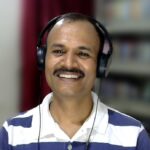
Bijay Muduli,
Graphic Designer
Professional Background:
What experience and inspiration brought you to pursue this work?
I’ve developed skills in user interface and visual design, using tools like Adobe Photoshop, Illustrator, InDesign, Dreamweaver.. My passion for fine art fuels my ability to create innovative designs.
What do you enjoy most about your job?
I love transforming ideas into visually appealing solutions. Each project brings fresh challenges, whether designing a brand identity or a user interface, keeping the work exciting and fulfilling.
Personal Interests:
What are your hobbies or interests outside of work?
Outside of work, I enjoy painting, writing in my native language, and listening to music for relaxation. Singing karaoke is my fun way to unwind and express myself.
Fun and Lighthearted Questions:
If you could have any superpower, what would it be and why?
The ability to instantly see and create design ideas. It would help me quickly visualize and refine designs in real-time.
What’s the most ridiculous thing you believed as a child?
When I swallowed a seed, I imagined a tree growing inside me— such a vivid imagination!:D
Share any random fact you like about yourself
I often find inspiration for design in unexpected places, like the patterns on a leaf or the color palette of a sunset. This helps me bring unique elements into my work.
What’s your favorite way to unwind after a long day?
Diving into a good book or enjoying some melodious music.

Randy Alvarez
Developer
Professional Background:
What experience and inspiration brought you to pursue this work?
I have 10 years as developer and leader, 20 years in technology. Lifelong learner passionate about applying knowledge to projects.
What do you enjoy most about your job?
I most enjoy being able to work with such a bright and professional team, both developers and non-developers alike.
Personal Interests:
What’s a fun fact about you that not many people know?
Boxing and fencing are my favorite sports and I watch and participate in both.
Fun and Lighthearted Questions:
What’s your favorite movie or TV show?
The Office
Are you a morning person or a night owl?
Night owl and I’ve tried many, many times to switch to mornings.
Coffee, tea or mate?
I run on coffee

Nick Ise
Project Manager
Professional Background:
What experience and inspiration brought you to pursue this work?
The technology is always evolving so things never stagnate. I enjoy working on interesting projects that allow me to be creative while learning about various industries.
Personal Interests:
What are your hobbies or interests outside of work?
Spending time in the ocean and mountains.
Fun and Lighthearted Questions:
If you could have any superpower, what would it be?
Teleportation
What’s your favorite movie or TV show?
Severance, Frasier
Are you a morning person or a night owl?
Morning

Quentin Rogers
Developer
Professional Background:
What experience and inspiration brought you to pursue this work?
I bring 20+ years of web design experience working on diverse projects. Inspired by constant innovation and design in the internet industry led me here.
What do you enjoy most about your job?
I love exploring new technologies, coming up with creative coding solutions for client’s problems and knowing that my work is helping them to meet their goals.
Personal Interests:
What’s a fun fact about you that not many people know?
Judging by my level of athleticism, you’d never guess that I have an Olympic gold medal winning athletes in both my biological and adoptive families.
Fun and Lighthearted Questions:
If you could have any superpower, what would it be and why?
Time travel…mostly stock market related, but I also have a long list of concerts I wish I’d been at.
If you could travel anywhere in the world, where would you go and why?
Some island where I could sleep in a thatched hut on the beach, swim with whale sharks and hang out with sloths.
What’s your favorite book or author?
Kurt Vonnegut

Masen Yaffee,
President
Professional Background:
What experience and inspiration brought you to pursue this work?
My parents were entrepreneurs and even before I knew WHAT I wanted to do, I knew that I wanted to start and build a business.
What do you enjoy most about your job?
I love working with smart, fun people to do things useful in the world.
Personal Interests:
What are your hobbies or interests outside of work?
Wakeboarding, mountain biking, martial arts, reading, aviation.
Fun and Lighthearted Questions:
If you could have any superpower, what would it be and why?
Super-speed, because I could get SOOOO much more done!!
What’s your favorite movie or TV show?
The Matrix
What’s your favorite way to unwind after a long day?
Hanging out in bed with my wife and the cat, playing on our phones
What’s your favorite book or author?
Branden Sanderson

Chris Bond,
Senior Programmer
Professional Background:
What experience and inspiration brought you to pursue this work?
I’ve loved computers since childhood, starting with BASIC programming on the Apple IIe. After studying Electronic Engineering, I taught myself programming, leading to a career as a web developer.
What do you enjoy most about your job?
When it comes to my job, I simply love creating. Whether it’s code or problem-solving, the joy of building something from scratch is what drives me.
Personal Interests:
What’s a fun fact about you that not many people know?
I can sing pretty well and if you tune the radio to a 90’s Country station, it will be rare if I don’t know most, if not all, of the words to any song that plays.
Fun and Lighthearted Questions:
If you could have any superpower, what would it be and why?
Teleporting
What’s your favorite movie or TV show?
Tin Cup
What’s your secret talent?
Reading people’s faces.
If you could travel anywhere in the world, where would you go and why?
Japan, because I love the culture and history.
What’s the most ridiculous thing you believed as a child?
That my dad could throw a football into orbit.

Damaris Bautista
Accounting
Professional Background:
What experience and inspiration brought you to pursue this work?
Twenty years of accounting and operations experience. I enjoy being hands-on and learning about business and this led me to my current position at NDIC.
What do you enjoy most about your job?
My passion for finance, technology, and entrepreneurship has always driven me, and working at NDIC allows me to continue learning and growing in these areas.
Personal Interests:
What’s a fun fact about you that not many people know?
I once scored tickets to a sold-out concert by offering the band wine and cheese through a DM. Years later, the band came over for wine and cheese before their Santa Barbara Bowl show.
Fun and Lighthearted Questions:
If you could travel anywhere in the world, where would you go and why?
A 3-month adventure through South America.
Are you a morning person or a night owl?
1000% night owl!
What’s a random fact about you?
I love jumping into bodies of water: lakes, rivers, pools, and most of all the ocean!

Bobby Ericson,
Team Leader of Project Management and Customer Support
Professional Background:
What experience and inspiration brought you to pursue this work?
I’ve led project management since 2016. As a natural leader, overseeing projects from start to finish is rewarding, and the satisfaction of completing each one never gets old.
What do you enjoy most about your job?
I enjoy helping businesses succeed, drawing from my own experience as a business owner. Websites, emails, and hosting are crucial, and NDIC excels in these areas, empowering our clients to thrive.
Personal Interests:
What are your hobbies or interests?
I love photography & cooking. Being from Lincoln, NE, I also have to mention college football. Go Big Red!
Fun and Lighthearted Questions:
Do you have a favorite quote or motto?
I am an Eagle scout. Our motto is Be Prepared. That has stuck with me since I learned it in Boy Scouts growing up.
What’s your favorite movie or TV show?
Friends & This is Us would be at the top. Movies: August Rush, Crazy, Stupid Love, The Emperor’s New Groove and almost any Disney/Pixar movie.
Share a random fact about you
I still have my original Nintendo, Super Nintendo and Sega from when I was a kid. My own kids now play those games and systems with me. It is so much fun! My 14 year old daughter is very good at the original Mario Kart on Super Nintendo.
What’s your favorite way to unwind after a long day?
I enjoy playing video games after a long day.

Abir Ahmed
Systems Administrator
Professional Background:
What experience and inspiration brought you to pursue this work?
Twelve years of experience in system administration inspired by Linux. RedHat Certified Architect with expertise in hosting and cloud technologies.
What do you enjoy most about your job?
The best part of my job is troubleshooting complex problems that challenge me to fix them and learn new or unfamiliar information along the way.
Personal Interests:
What are your hobbies or interests outside of work?
I LOVE to ride motorcycles.
Fun and Lighthearted Questions:
If you could have any superpower, what would it be and why?
Being immune to any sort of motorcycle accidents
What’s your favorite movie or TV show?
The Big Bang Theory
What’s the most ridiculous thing you believed as a child?
I believed life would be much easier as an adult.

Sofia Ferrara
Customer Support
Professional Background:
What experience and inspiration brought you to pursue this work?
I have experience in customer service and English proficiency. Working online is new to me and presents an interesting earning opportunity.
What do you enjoy most about your job?
I enjoy feeling a part of a team and being able to count on the people I work with. I am also learning as I go how to be more productive with my time.
Personal Interests:
What’s a fun fact about you that not many people know?
I am a foodie, I like to make food something special, so I am usually looking for good restaurants and trying new food. I am also a picky eater so it’s a fun combo.
Fun and Lighthearted Questions:
What’s your favorite book or author?
Eragon, The Hobbit, Lord of the Flies, Where the Crawdads Sing, and War and Peace
What’s your favorite movie or TV show?
The Dead Poet Society, Howl’s Moving Castle, Princess Bride, Stardust, and Labyrinth.
What’s your favorite way to unwind after a long day?
I dance or take a Pilates class to work out the long day.

Dani Garcia,
Project Manager
Professional Background:
What experience and inspiration brought you to pursue this work?
I fell in love with SEO and have enjoyed projects in that area ever since. My operations management experience also fuels my passion for process improvement in digital marketing.
What do you enjoy most about your job?
Helping clients bring their ideas to life or improve their digital solutions is incredibly rewarding. I love client communication and leveraging my organizational skills to enhance projects.
Personal Interests:
What are your hobbies or interests?
I’m passionate about outdoor activities, nature, and traveling. I also enjoy giving back to my community whenever I can.
Fun and Lighthearted Questions:
If you could have any superpower, what would it be and why?
Lightspeed flying would be so much fun and it would allow me to travel as desired.
What’s your favorite movie or TV show?
Friends & This is Us would be at the top. Movies: August Rush, Crazy, Stupid Love, The Emperor’s New Groove and almost any Disney/Pixar movie.
Share a random fact about you
I’m a sunset hunter, known for appreciating the small, beautiful details in life.
What’s your favorite way to unwind after a long day?
Coffee or dinner with friends, a movie and comfort food, yoga or pilates to name a few 🙂

Joni Mozis
Project Manager
Professional Background:
What experience and inspiration brought you to pursue this work?
I have an extensive background in marketing and web design but my passion lies in crafting custom websites that truly reflect each client’s unique essence. I enjoy working with many types of clients and businesses to help them create an online presence.
What do you enjoy most about your job?
The idea of blending creativity with marketing and tech to solve real-world problems. That’s what fuels me: helping clients bring their visions to life and reach their goals.
Personal Interests:
What’s a fun fact about you that not many people know?
I grew up in Minnesota so my blood runs purple, meaning I am a huge fan of Prince and the Minnesota Vikings.
Fun and Lighthearted Questions:
If you could have any superpower, what would it be?
To be able to speak and understand all languages including communicating with animals other than humans.
What’s your favorite movie or TV show?
Friends
Do you have a favorite quote or motto that you live by?
You only die once – live every day!
What’s your secret talent?
I’m fluent in Minnesotan — dontcha know 🙂