Potpourri
How to – Create a Database in cPanel
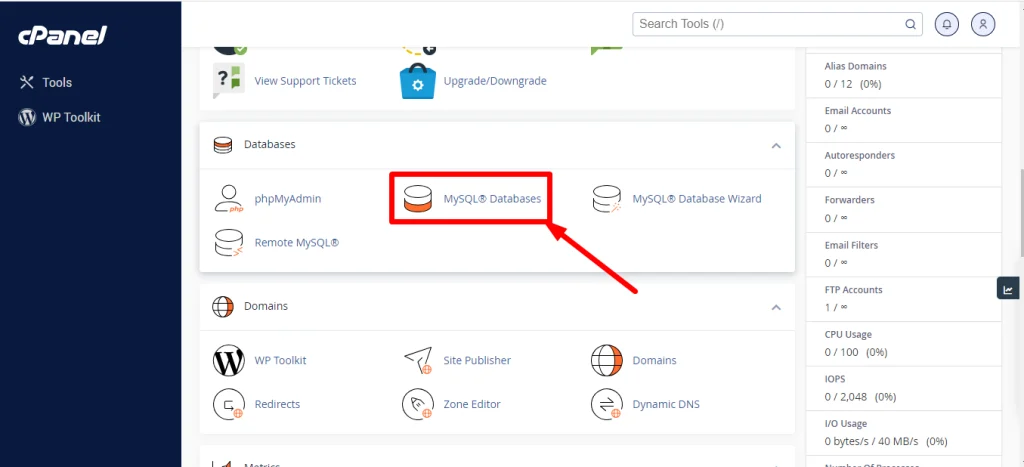
- Log in to cPanel.
- Navigate to the Databases Section.
Look for the “Databases” section. Within the “Databases” section, search for and click on the “MySQL Databases” option. This tool will allow you to create and manage MySQL databases in cPanel.
- Create a New Database.
Once you are in the “MySQL Databases” tool, you will see a section for creating a new database. You should follow these steps:Assign a Name to the Database: Choose a name for your new database. This name must be unique.Create the Database: Click on the “Create Database” button. cPanel will create the database and show you a confirmation that it has been successfully created.


- Create a User to the Database.
Navigate to the MySQL User section, click on “Add New User,” and enter the username that will have access to the database. Similarly, set a secure password and click en “Create User” button.
- Assign the user to the database.
Now assign the user to the database. This allows the user to access and manage the database. To do this, follow these steps:Assign the user to the database: Navigate to the “Add user to Database” section, select the user and the database; this will assign the user to the database.
Manage the user’s permissions: Assign privileges to the user for the database. We recommend selecting “All Privileges” and clicking the “Make Changes” button. You can specify individual privileges as needed.


That’s it! You have successfully created a database in cPanel and assigned a user to that database. Now you can use this database to store and manage data on your website or application.